
Fingerprint authentication system settings
To use the system, the driver’s fingerprint must be enrolled in the driver’s profile. The drivers can set or delete their fingerprint through the infotainment system. Follow the following procedure.
Enrolling fingerprint
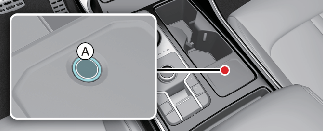
-
Turn on the vehicle.
-
Select Setup → User Profile → Driver 1 → Fingerprint Identification → Set/Delete Fingerprint → Set in the infotainment.
-
Gently place your finger hat you would like to enroll on the fingerprint sensor (A) according to the instruction. Fingerprint authentication attempts with excessive force may fail
-
Following the instructions, place several parts of your fingerprint until the scanning process is complete.
-
Once the scanning process is completed, the message Saving fingerprint appears and the fingerprint enrollment process is complete.
-
When the fingerprint enrollment process is completed in the vehicle, the status is displayed on the infotainment system.
-
The fingerprint enrollment process is canceled when the following condition occurs:
-
The infotainment system screen is altered.
-
The ENGINE START/STOP button turns on or off.
-
The gear is shifted and the vehicle is driven.
-
-

The infotainment system may change after software updates. For more information, refer to the manual provided in the infotainment system and the quick reference guide.
Deleting fingerprint
-
Select Setup → User Profile → Driver 1 → Fingerprint Identification → Set/Delete Fingerprint → Delete in the infotainment system screen.
-
Delete the enrolled fingerprint according to the message “Delete all Driver 1 fingerprints?”
-
Once the fingerprint is deleted, the status is displayed on the infotainment system screen.
-
If no fingerprint is enrolled in the infotainment system, the sensor will not operate.
-
The maximum of two fingerprint can be enrolled. Driver 1 and Driver 2 can enroll one fingerprint each.
-
Please remove all substances including protection film on the fingerprint sensor and enroll your fingerprint.
-
The fingerprint enrollment process is canceled when the following condition occurs:
-
The infotainment system screen is altered.
-
The ENGINE START/STOP button turns on or off.
-
The gear is shifted and the vehicle is driven.
-

Do not duplicate your fingerprint with anyone.
Touch the fingerprint authentication sensor gently. Fingerprint authentication attempts with excessive force may fail.
The infotainment system may change after software updates. For more information, refer to the manual provided in the infotainment system and the quick reference guide.