
Driving Rear View (DRV) function
Driving Rear View function is used to switch ON the Rear View Monitor when driving forward.
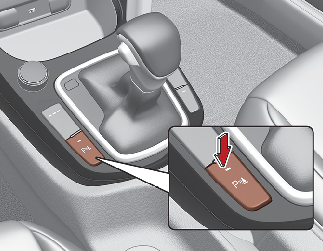


No guidelines will be shown when DRV is switched ON. Rear View has higher priority compared to DRV View.
DRV function activates when:
-
8” display: Turn the ignition switch ON, press the DRV button (
 ) in the display unit.
-
10” display: Turn the ignition switch ON, press the Parking/View button (
 ) in the console.
You can turn off DRV function by doing one of the followings:
-
Automatic transmission: Change the gear shift lever to "P" (Park).
-
Manual transmission: Engage the parking brake.
-
8” display: press the back button (
 ) or any hard button in the display unit.
-
10” display: Press the Parking/View button (
) in the console again.