
Forward/Reverse Parking Distance Warning settings
Warning Volume
A: Driver assistance
-
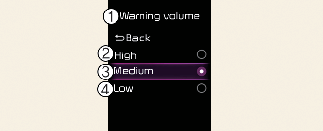
Warning volume
-
High
-
Medium
-
Low
Select Settings → Driver assistance → Warning volume from the User Settings menu to change the Warning Volume to High, Medium, or Low for Forward/Reverse Parking Distance Warning.

If you change the Warning Volume, the warning volume of other Driver Assistance systems may change.
Parking Distance Warning Auto On
You can set the parking distance warning to be ON at low speeds. To use Parking Distance Warning Auto On function, select Settings → Driver assistance → Parking safety → Parking Distance Warning Auto On from the User Settings menu.
If Parking Distance Warning Auto On is selected, the Parking Safety ( ) button indicator light will turn on.