

LCD display modes
|
|
||||
|---|---|---|---|---|
 Trip Computer |
 Driving Assist |
 Turn by Turn (TBT)* |
Information/Marster warning |
|
|
Up/Down |
Current Trip |
Lane Keeping Assist* Smart Cruise Control* Navigation-based Smart Cruise Control* Lane Following Assist* Highway Driving Assist* |
Route Guidance |
The Master Warning mode displays warning messages related to the vehicle when one or more systems is not operating normally. |
|
Since Refueling |
||||
|
Since Last Reset |
||||
|
Auto Stop* |
||||
|
Urea Level* |
Destination Info |
|||
|
Tire Pressure Monitoring System |
||||
|
Driving Force Distribution* |
||||
 Mode



The information provided may differ depending on which functions are applicable to your vehicle.
: if equipped
Trip computer mode
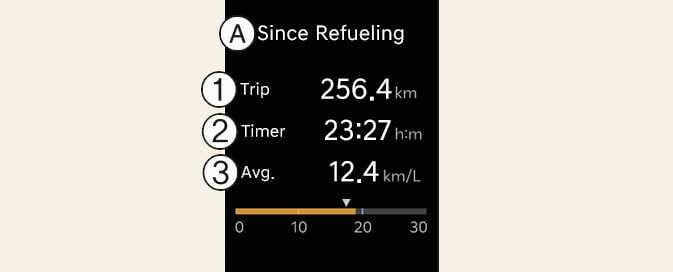
A: Current Trip
-
Trip
-
Timer
-
Avg.
The trip computer mode displays information related to vehicle driving parameters including fuel economy, tripmeter information and timer.
For more details, refer to Trip information (trip computer).
Driving Assist mode

This mode displays the state of:
-
Lane Safety system: (if equipped)
-
Smart Cruise Control: (if equipped)
-
Lane Following Assist: (if equipped)
-
Tire pressure
For more details, refer to each system information in Driving your vehicle.
Turn By Turn (TBT) mode

This mode displays the state of the navigation.
Master warning mode


This mode informs you of the followingsituations:
-
Driver assistance system malfunction, limitation or radar/camera blockage: (if equipped)
-
LED headlamp malfunction
-
Lamp malfunction
-
TPMS failure, low tire pressure, etc.
At this time, the Master Warning icon (
 ) will appear. If the warning situation is solved, the master warning light will be turned off and the Master Warning icon will disappear.