Warning methods
 OMV073123L12 |
|
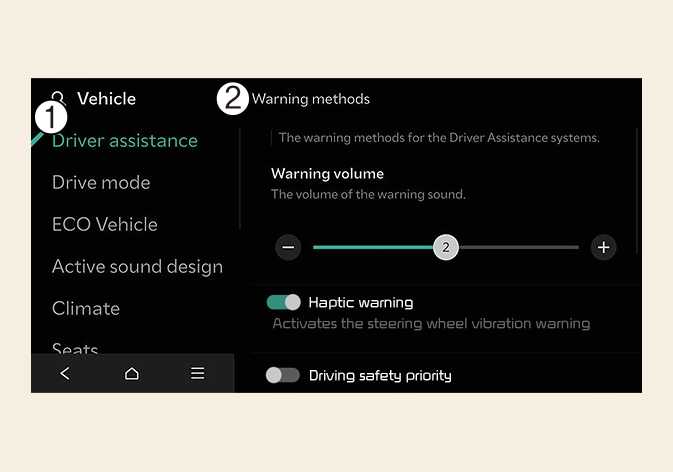
The Warning methods can be set with the vehicle on. Select [[ Settings → Vehicle → Driver assistance → Warning methods]] from the settings menu in the infotainment system to change the following settings:
-
Warning volume: Adjusts the volume of the warning sound. If you turn off the Warning volume, for your safety, the function may warn you with a low volume.
-
Ensure that Warning methods you have set may apply to the Warning methods of other driver assistance systems.
-
Warning methods will maintain its last setting even if the vehicle is restarted.
-
The setting menu may not be available for your vehicle depending on the vehicle features and specifications.
-
Ensure that Warning methods you have set may apply to the Warning methods of other driver assistance systems.
-
Warning methods will maintain its last setting even if the vehicle is restarted.
-
The setting menu may not be available for your vehicle depending on the vehicle features and specifications.