Limitations of Smart Cruise Control
Smart Cruise Control may not operate normally under the following circumstances:
-
The detecting sensor or the surroundings are contaminated or damaged
-
Washer fluid is continuously sprayed, or the wiper is on
-
The camera lens is contaminated due to tinted, filmed or coated windshield, damaged glass, or sticky foreign material (sticker, bug, etc.) on the glass
-
Moisture is not removed or frozen on the windshield
-
The field of view of the front view camera is obstructed by sun glare
-
Street light or light from an oncoming vehicle is reflected on the wet road surface, such as a puddle on the road
-
The temperature around the front view camera is high or low
-
An object is placed on the instrument panel
-
The surrounding is very bright
-
The surrounding is very dark, such as in a tunnel, etc.
-
The brightness changes suddenly, for example when entering or exiting a tunnel
-
The brightness outside is low, and the headlamps are not on or are not bright
-
Driving in heavy rain or snow, or thick fog
-
Driving through steam, smoke, or shadow
-
Only part of the vehicle is detected
-
The vehicle in front has no tail lights, tail lights are located unusually, etc.
-
The brightness outside is low, and the tail lights are not on or are not bright
-
The rear of the front vehicle is small or does not look normal (for example, tilted, overturned, etc.)
-
The front vehicle’s ground clearance is low or high
-
A vehicle suddenly cuts in front
-
Your vehicle is being towed
-
An object reflecting off the front radar such as a guardrail, nearby vehicle, etc.
-
The bumper around the front radar is impacted, damaged, or the front radar is out of position
-
The temperature around the front radar is high or low
-
The vehicle in front is made of material that does not reflect on the front radar
-
Driving near a highway (or motorway) interchange or tollgate
-
Driving on a slippery surface due to snow, water puddle, ice, etc.
-
Driving on a curved road
-
The vehicle in front is detected late
-
The vehicle in front is suddenly blocked by an obstacle
-
The vehicle in front suddenly changes a lane or suddenly reduces speed
-
The vehicle in front is bent out of shape
-
The front vehicle’s speed is fast or slow
-
With a vehicle in front, your vehicle changes a lane suddenly at low speed
-
The vehicle in front is covered with snow
-
Unstable driving
-
You are on a roundabout and the vehicle in front is not detected
-
You are continuously driving in a circle
-
The adverse road conditions cause excessive vehicle vibrations while driving
-
Your vehicle height is low or high due to heavy loads, abnormal tire pressure, etc.
-
Driving in following places
-
Driving in a car park
-
Driving through a construction area, unpaved road, partial paved road, uneven road, speed bumps, etc.
-
Driving on an inclined road, curved road, etc.
-
Driving through a roadside with trees or street lights
-
Driving through a narrow road where trees or grass are overgrown
-
There is interference by electromagnetic waves, such as driving in an area with strong radio waves or electrical noise
-
Driving on a curved road
-
-
Driving through a tunnel or iron bridge
-
Driving near areas containing metal substances, such as a construction zone, railroad, etc.
-
Driving in vast areas where there are few vehicles or structures (for example, desert, meadow, suburb, etc.)
-
Driving through steam, smoke, or shadow
-
Driving near a highway (or motorway) interchange or tollgate
-
Driving near areas containing metal substances, such as a construction zone, railroad, etc.
-
-
Driving on a curved road
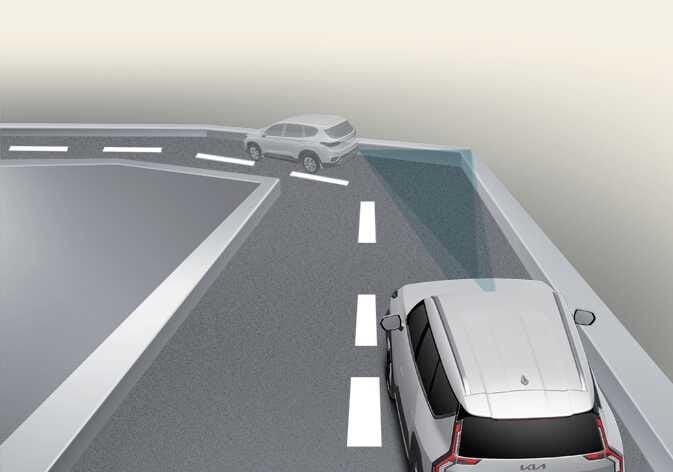 OMV073266L
On curves, Smart Cruise Control may not detect a vehicle in the same lane, and may accelerate to the set speed. Your vehicle speed may rapidly decrease when a vehicle ahead is detected suddenly.
Select the appropriate set speed on curves, and engage the brake pedal or accelerator pedal according to the road and driving conditions ahead.
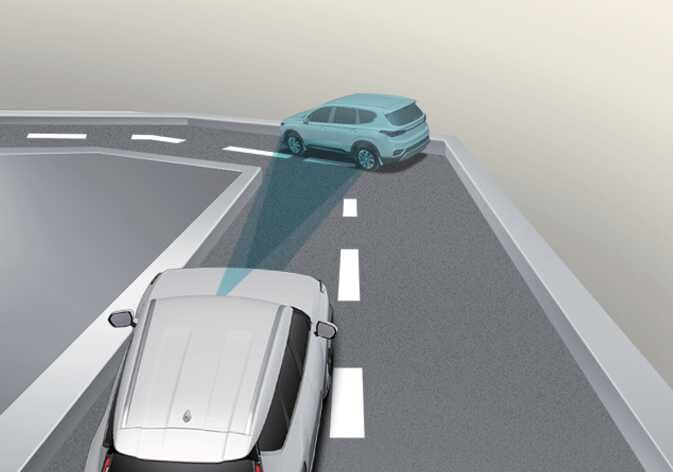 OMV073156L
Smart Cruise Control may reduce your vehicle speed due to the presence of a vehicle in an adjacent lane.
Check that the road conditions permit safe operation of Smart Cruise Control. If necessary, engage the brake pedal to reduce your speed and maintain a safe following distance.
-
Driving on an inclined road
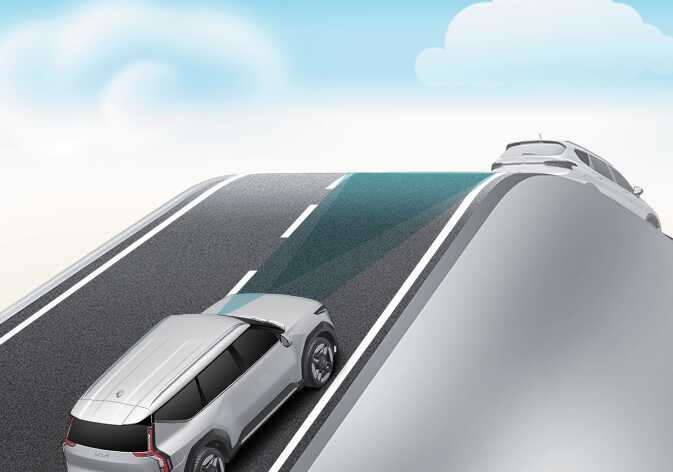 OMV073157L
When you drive uphill or downhill, Smart Cruise Control may not detect a moving vehicle in your lane, causing your vehicle to accelerate to the set speed. Your vehicle speed will rapidly decrease when a vehicle ahead is detected suddenly.
Select the appropriate set speed on inclines, and engage the brake pedal or accelerator pedal according to the road and driving conditions ahead.
-
Changing lanes
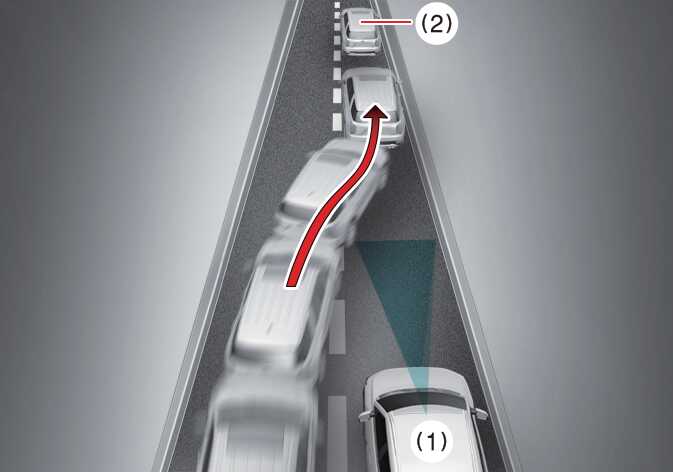 OSV054184
-
Your vehicle
-
Lane changing vehicle
When a vehicle (2) moves into your lane from an adjacent lane, the sensor cannot detect it until it is in the detection range. Smart Cruise Control may not immediately detect the vehicle when it changes lanes abruptly. You must maintain a safe braking distance and, if necessary, engage the brake pedal to reduce your speed.
-
-
Detecting a vehicle
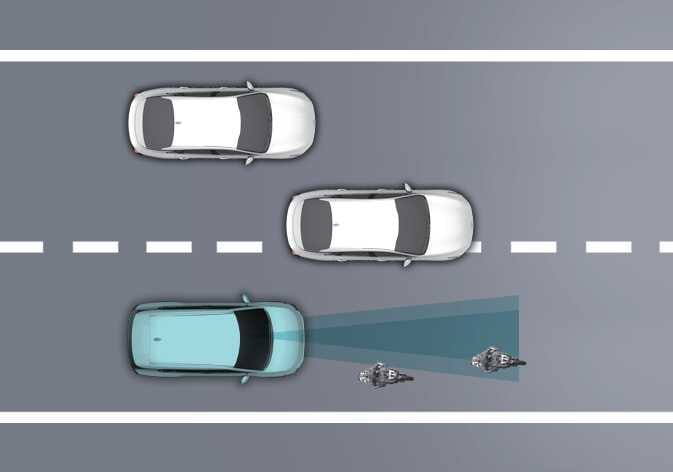 OSV054299
The sensor cannot detect the following types of vehicles or objects:
-
Vehicles driving to one side.
-
Slow-moving or suddenly-decelerating vehicles.
-
Vehicles with higher ground clearance, or vehicles carrying loads that stick out of the back of the vehicle.
-
Vehicles with the front lifted due to heavy loads.
-
Vehicles within approximately 2 m (6 ft) of your vehicle.
-
Oncoming vehicles.
-
Stopped vehicles.
-
Vehicles with a small rear profile, such as trailers.
-
Narrow vehicles, such as motorcycles or bicycles.
-
Specialty vehicles.
-
Animals and pedestrians.
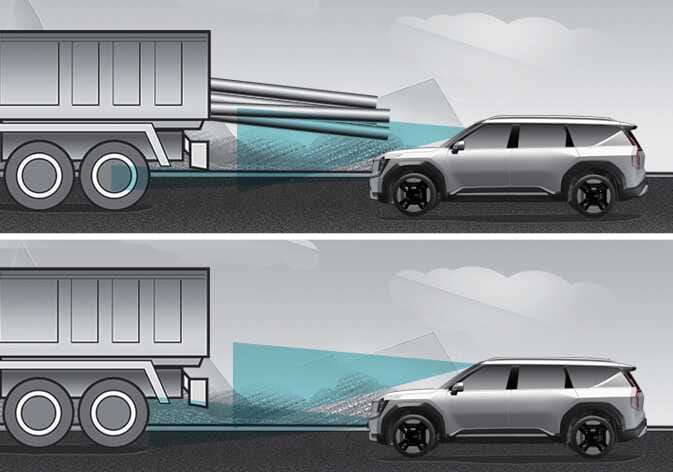 OMV073160L_2
Always pay attention to the road and driving conditions and drive safely. If necessary, adjust your vehicle speed. The sensor cannot detect the vehicle ahead in the following cases:
-
You are steering your vehicle.
-
You are driving on narrow or sharply curved roads.
-
-
When a vehicle ahead disappears from view at an intersection
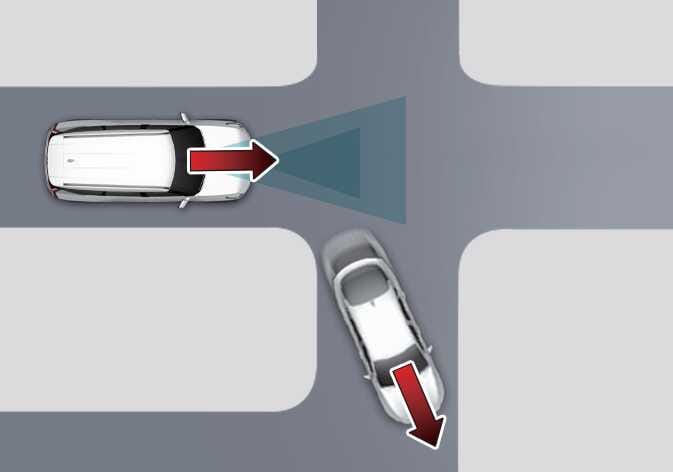 OMV073161L
When a vehicle ahead disappears from view at an intersection, your vehicle may accelerate.
Always pay attention to the road and driving conditions.
-
When a vehicle ahead of you changes lanes
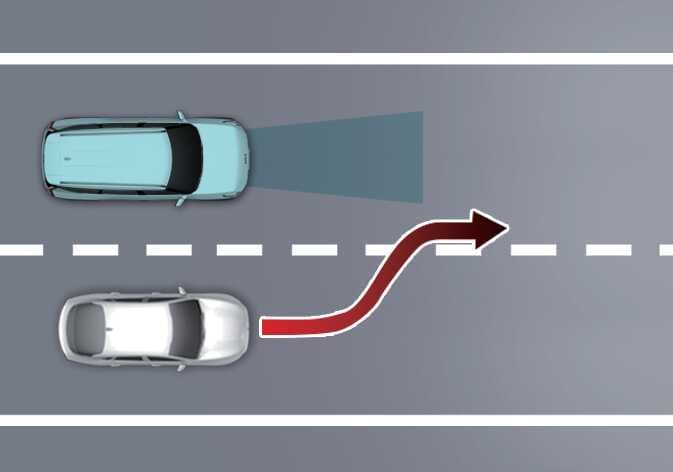 OMV073162L
When a vehicle ahead of you changes lanes, Smart Cruise Control may not immediately detect the new vehicle that is now ahead of you.
Always pay attention to the road and driving conditions.
-
Always look out for pedestrians
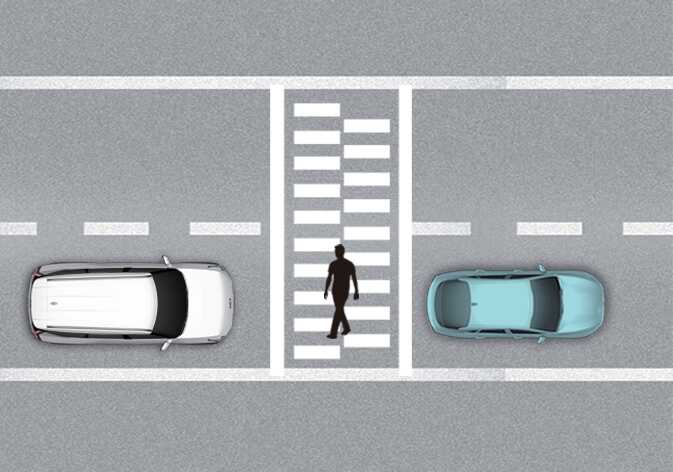 OMV073163L
Always look out for pedestrians when your vehicle is maintaining a set distance from the vehicle ahead.