

Setting features
Forward Safety
A: Driver Assistance
-
Forward Safety
-
Active Assist
-
Warning Only
-
Off
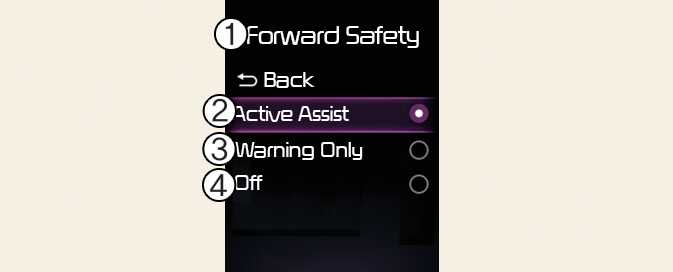
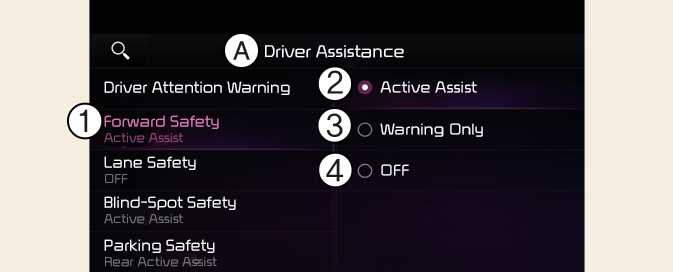
With the vehicle on, select Settings → Driver assistance → Forward safety from the User Settings menu or select Settings → Vehicle → Driver assistance → Forward safetyfrom the infotainment system to set whether or not to use each function.
-
Active Assist: Forward Collision-Avoidance Assist will warn the driver with a warning message, and an audible warning depending on the collision risk levels. Braking assist will be applied depending on the collision risk.
-
Warning Only: Forward Collision-Avoidance Assist will warn the driver with a warning message, and an audible warning depending on the collision risk levels. Braking will not be assisted. The driver must apply the brake pedal or steer the vehicle if necessary.
-
Off: Forward Collision-Avoidance Assist will turn off. The warning light (
 ) will appear on the cluster.
The driver can monitor Forward Collision-Avoidance Assist ON/OFF status from the Settings menu. If the warning light (
 ) remains ON when Forward Collision-Avoidance Assist is ON, have the vehicle inspected by an authorized Kia dealer.
When the vehicle is restarted, Forward Collision-Avoidance Assist will always turn on. However, if Off is selected, the driver should always be aware of the surroundings and drive safely.
-
If Warning Only is selected, braking is not assisted.
-
The settings for Forward Safety include 'Basic function' and 'Junction Turning'.
Forward Collision-Avoidance Assist will turn off when ESC is turned off by pressing and holding the ESC OFF button. The warning light (
 ) will appear on the cluster.