
Rear Cross-Traffic Collision Warning settings
Rear Cross-Traffic Safety
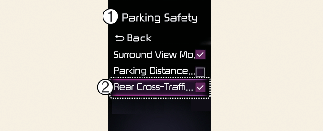
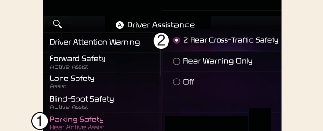
A: Driver Assistance
-
Parking Safety
-
Rear Cross-Traffic Safety
With the engine on, select User Settings → Driver Assistance → Parking Safety →Rear Warning Only from the settings menu in the instrument cluster or Setup → Vehicle → Driver Assistance → Parking Safety →Rear Warning Only from the settings menu in the infotainment system to turn on Rear Cross-Traffic Collision Warning and deselect to turn off the function.

When the engine is restarted, Rear Cross-Traffic Collision Warning will automatically turn on. However, if 'Off' is selected after the engine is restarted, the driver should always be aware of the surroundings and drive safely.
Warning Timing
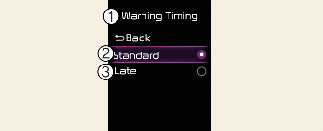
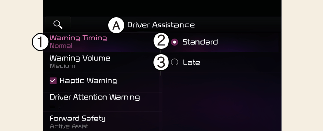
A: Driver assistance
-
Warning timing
-
Standard
-
Late
With the engine on, select With the vehicle on, select User Settings → Driver Assistance → Driver Assistance → Warning Timing from the settings menu in the instrument cluster or select Setup → Vehicle → Driver Assistance → Driver Assistance → Warning Timing from the settings menu in the infotainment system to change the Settings for Rear Cross-Traffic Collision-Avoidance Warning. You can set the warning point to Standard or Late.
-
Standard: Use in a typical driving environment. Select 'Late' if the Warning Timing feels too sensitive.

If you change the Warning Timing, the warning time of other Driver Assistance systems may change.
Warning methods
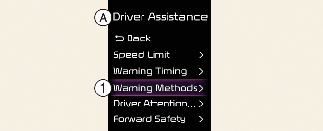
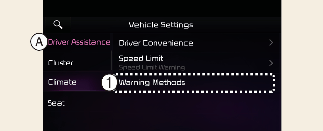
A: Driver Assistance
-
Warning Methods
The Warning Methods can be set with the vehicle on. Select User Settings → Driver Assistance → Warning Methods from the settings menu in the instrument cluster or Setup → Vehicle → Driver Assistance → Warning Methods from the settings menu in the infotainment system to change the following settings:
-
Warning Volume: Adjusts the volume of the warning sound.
-
Haptic Warning: Activate the steering wheel vibration warning. (if equipped)
-
If you change the Warning Methods, it can be applied to each function of the driver assistance system. Please check and change it in each function.
-
If the vehicle is restarted, Warning Methods will maintain the last setting.
-
The setting menu may not exist based on vehicle specification.