

LCD display messages
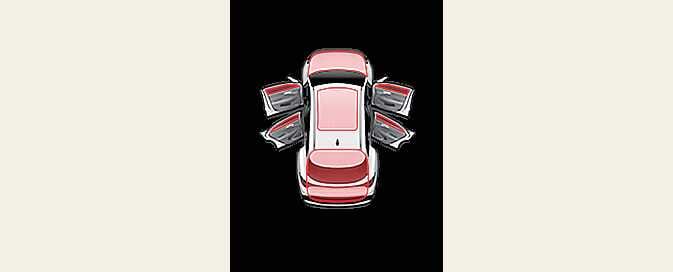
Door, hood, liftgate, sunroof open
 ONQ5H034107 |
-
This warning is displayed indicating which door, the hood, the liftgate or the sunroof is open.
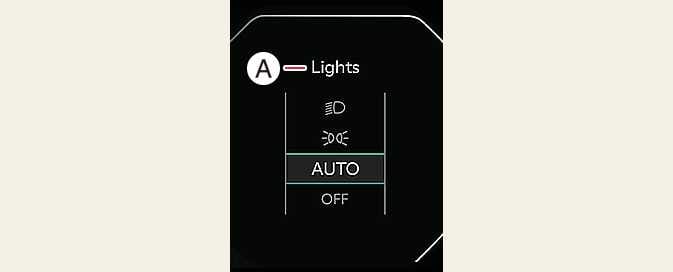
Lights mode
 OGL3034136L |
A: Lights |
This indicator displays which exterior light is selected using the lighting control.
You can activate or deactivate Wiper/Lights Display function from the User Settings mode in the cluster LCD display.
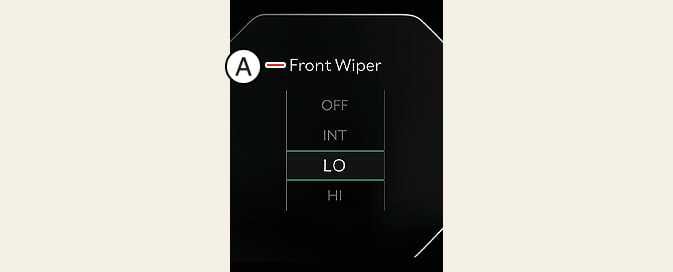
Wiper mode
 ONQ5035123N |
A: Front Wiper |
This indicator displays which wiper speed is selected using the wiper control.
You can activate or deactivate Wiper/Lights Display function from the User Settings mode in the cluster LCD display.
Engine overheated
 OMQ4033133L |
A: Engine Overheated |
-
This warning message appears when the engine coolant temperature is above 248 °F (120 °C). This means that the engine is overheated and may be damaged.
If your vehicle is overheated, refer to If the engine overheats.
Low washer fluid
-
This warning message illuminates if the washer fluid level in the reservoir is nearly empty.
Low engine oil
-
This warning message appears when the engine oil level is insufficient.
-
Refill the engine oil.
For more details, refer to Engine oil and filter.
When the engine oil level warning light appears, check whether maintenance schedule (Engine oil replacement) in owner’s manual has been followed before replenishing the oil. If not followed, the engine oil must be replaced.
Engine oil change due soon. Reset oil life after oil change
-
This warning message appears when the remaining engine oil life reaches 5% or below.
-
Replace engine oil from an authorized Kia dealer. After that, select from the User Settings menu on the cluster or from Settings menu on the infotainment system screen to reset the remaining oil life.
For more details, refer to Engine oil and filter.
Engine oil change due now. Reset oil life after oil change
-
This warning message appears when the remaining engine oil life reaches 1% or below.
-
Replace engine oil immediately from an authorized Kia dealer. After that, select from the User Settings menu on the cluster or from Settings menu on the infotainment system screen to reset the remaining oil life.
For more details, refer to Engine oil and filter.
Low key battery (for smart key system)
-
This warning message appears if the battery of the smart key is discharged when ENGINE START/STOP button changes to the OFF position.
Key not in vehicle (for smart key system)
-
This warning message appears if the smart key is not in the vehicle when you press the ENGINE START/STOP button.
-
Always have the smart key with you.
Key not detected (for smart key system)
-
This warning message appears if the smart key is not detected when you press the ENGINE START/STOP button.
Shift to P or N to start engine (for smart key system)
-
This warning message appears if you try to start the engine with the gear not in the P (Park) or N (Neutral) position.
Press brake pedal to start engine (for smart key system)
-
This warning message appears if the ENGINE START/STOP Button changes to the ACC position twice by pressing the button repeatedly without depressing the brake pedal.
-
Depress the brake pedal to start the engine.
Battery discharging due to external electrical devices
The vehicle can detect self-discharge of the battery due to over-current that is generated by unauthorized electrical devices such as instrument panel camera (dash cam).
If the warning continues even after external electrical devices are removed, have your vehicle inspected by an authorized Kia dealer.
Press START button again (for smart key system)
-
This warning message appears if you cannot operate the ENGINE START/STOP button when there is a problem with the ENGINE START/STOP button system.
-
It means that you could start the engine by pressing the ENGINE START/STOP button once more.
-
If the warning appears each time you press the ENGINE START/STOP button, have the vehicle inspected by an authorized Kia dealer.
Press START button with key (for smart key system)
-
This warning message appears if you press the ENGINE START/STOP Button while the warning message “Key not detected” is illuminated.
-
The immobilizer indicator light blinks.
Headlights are Off
This warning message appears if the headlights are off when the surrounding is dark.
Check Active Air Flap System
This warning message appears in thefollowing situations:
-
There is a malfunction with the actuator flap.
-
There is a malfunction with the actuator air flap controller.
When all of the above conditions are fixed, the warning disappears.