
Driver Attention Warning settings
DAW (Driver Attention Warning)

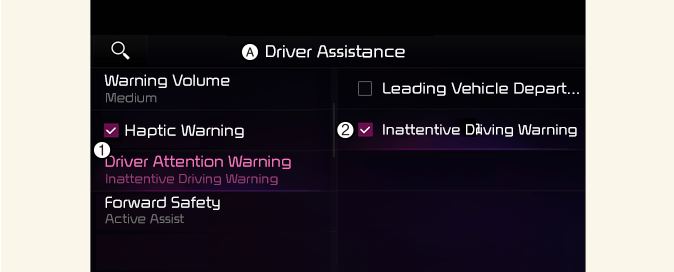
A: Driver assistance
-
Driver Attention Warning
-
Inattentive driving warning
With the vehicle on, select or deselect Driver assistance → Driver Attention Warning from the Settings menu to set whether or not to use each function.
-
Inattentive Driving Warning: Driver Attention Warning will inform the driver the driver's attention level and will recommend taking a break when the level falls below a certain level.

Whenever the vehicle is turned on, Inattentive Driving Warning will always turn on. (For Europe)
Leading Vehicle Departure Alert

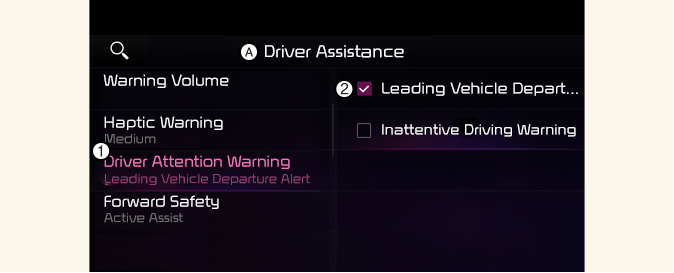
A: Driver assistance
-
Driver Attention Warning
-
Leading Vehicle Departure Alert
Leading Vehicle Departure Alert: The function will inform the driver when the front vehicle departs from a stop.
Warning timing

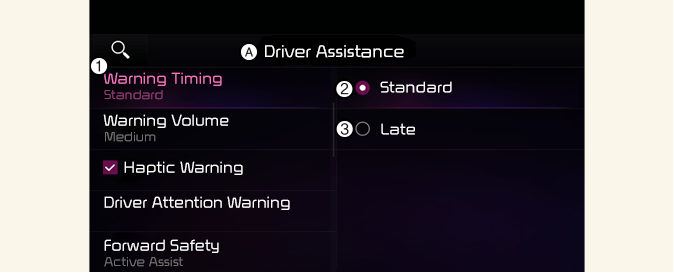
A: Driver assistance
-
Warning timing
-
Standard
-
Late
With the vehicle on, select Driver assistance → Warning timing from the Settings menu to change the initial warning activation time for Driver Attention Warning.
-
Standard: Use in a normal driving environment. If Driver Attention Warning operates too sensitive, set the warning timing to Late.
-
Late: The warning timing will be late
-
If you change the Warning Timing, the warning time of other Driver Assistance systems may change.
-
If the vehicle is restarted, Driver Warning Time will maintain the last setting.