

Replacing the key battery
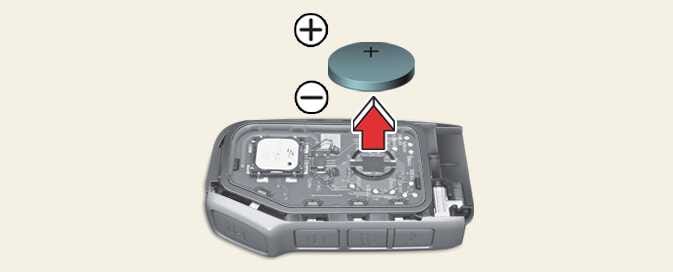 OCV041005L |
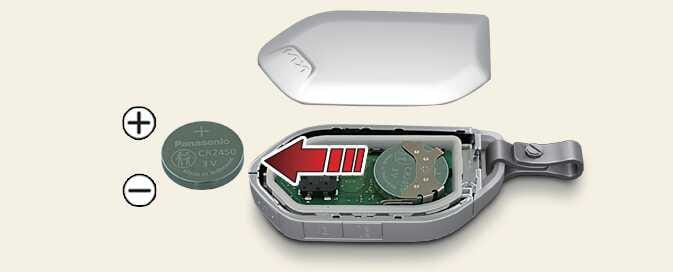 OMV033004 |
Operation
-
Pry open the key cover gently.
-
Replace the old battery with a new battery.
When replacing the battery, make sure the battery position is correct.
-
Remote key: CR2032
-
Smart key: CR2450
If the battery is assembled with incorrect polarity, it will discharge, rendering the key unusable.
THIS PRODUCT CONTAINS A BUTTON BATTERY
If swallowed, a lithium button battery can cause severe or fatal injuries within 2 hours.
Keep batteries out of reach of children.
If you think batteries may have been swallowed or placed inside any part of the body, seek immediate medical attention.
Leaving children unattended in a vehicle with the keys is dangerous even if the vehicle is ACC or ON position.
Unattended children could place the mechanical key in the ignition switch or press the ENGINE START/STOP button and may operate power windows or other controls, or even make the vehicle move, which could result in SERIOUS BODILY INJURY OR EVEN DEATH.
Never leave the keys in your vehicle with unsupervised children, when the engine is running.
-
The remote key or smart key is designed to give you years of trouble-free use, however it can malfunction if exposed to moisture or static electricity. If you are unsure how to use or replace the battery, Kia recommends that you contact an authorized Kia dealer/service partner.
-
Using the wrong battery can cause the remote key or smart key to malfunction. Be sure to use the correct battery.
-
To avoid damaging the remote key or smart key, don't drop it, get it wet, or expose it to heat or sunlight.
-
 An inappropriately disposed battery can be harmful to the environment and human health. Dispose the battery according to your local law(s) or regulation.