

Smart key
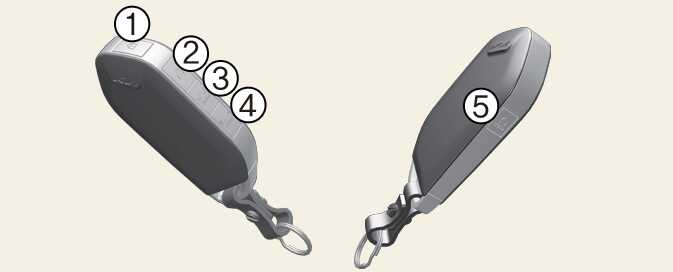
With a smart key, you can lock or unlock a door (and liftgate).
Refer to the following for more details.
Lock (1)
All doors are locked if the lock button on the smart key or the touch sensor on the door handle is pressed. If all doors are closed, the hazard warning lights will blink and the chime will sound once to indicate that all doors are locked.
Also, if the lock button or the touch sensor is pressed once more within 4 seconds, the hazard warning lights will blink and the chime will sound once to confirm that the door is locked.
However, if any door remains open, the hazard warning lights (and/or the chime) will not operate. But if all doors are closed after the lock button/sensor is pressed, the hazard warning lights will blink once.
Unlock (2)
The driver's side is unlocked if the unlock button on the smart key is pressed once or the hand is detected in the door handle pocket. The hazard warning lights will blink twice and the chime will sound twice to indicate that the driver's door is unlocked.
All the doors are unlocked if the unlock button on the smart key is pressed once more or the hand is detected in the door handle pocket again within 4 seconds. The hazard warning lights will blink (for smart key, the chime also sounds) twice again to indicate that all doors are unlocked. After pressing this button/hand is detected, the doors will lock automatically unless you open any door within 30 seconds.
If you attempt to lock or unlock the door by pressing the button/sensor or putting hand inside the door handle pocket in any of the following situations, the door will not be locked or unlocked.
-
When you want to lock or unlock the door in the ACC or ON state.
-
When you want to lock a door in a car with one or more doors open.
Depending on the vehicle, the driver can turn off or set the 2-press unlock setting function.
If the keyless entry system is inoperative due to exposure to water or liquids, it will not be covered by your manufacturer's vehicle warranty.
Liftgate unlock/open (3)
If you press the button for longer than a second, the lock will be released or the lift gate will be opened according to the options of the vehicle.
Once the liftgate is opened and then closed, the liftgate will lock automatically.
If you are within 28~40 inches (0.7~1 m) from the outside liftgate handle, with your smart key in possession, the liftgate will unlock and open when you press the liftgate handle switch.
The hazard warning lights will blink twice to indicate that the liftgate is unlocked.
Also, once the liftgate is opened and then closed, the liftgate will lock automatically.
Panic (4)
If you press the key's panic button in an emergency situation, the alarm system will be activated and alert others around you of the emergency situation.
-
Press the panic button (4) for a few seconds.
-
The horn sounds and hazard warning light flash for a few seconds.
To stop the horn and lights, press any button on the smart key.
Remote start (5)
You can start the engine and turn on the climate system by pressing the remote start button (4) outside the vehicle equipped with automatic transmission.
To start and stop engine remotely:
-
Press the door lock button (1), and then the hazard warning lights blink once to alert you.
-
Press the remote start button (5) for more than 2 seconds to start engine within 4 seconds after pressing the door lock button (1).
-
While remote starting, the hazard warning lights blink. If you want to stop the engine, press the remote start button (5) again.
The climate system will be continuously maintained, as selected when the engine is restarted. If the climate system is turned off before you stopped the engine, the climate system will not operate when you start the engine remotely.
Start-up
You can start the vehicle without inserting the key.
For information, refer to ENGINE START/STOP button.