
Driver Attention Warning settings
Driver Attention Warning

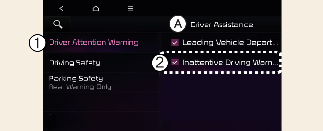
A: Driver Assistance
-
Driver Attention Warning
-
Inattentive Driving Warning
With the vehicle on, touch or deselect Settings → Driver Assistance → Driver Attention Warning on the instrument cluster or select Settings → Vehicle → Driver Assistance → Driver Attention Warning on the infotainment system.
-
If Inattentive Driving Warning is selected, Driver Attention Warning will recommend taking a break when the level falls below a certain level.

Whenever the engine is turned on, Inattentive Driving Warning will always turn on. (For Europe, Russia)
Leading Vehicle Departure Alert

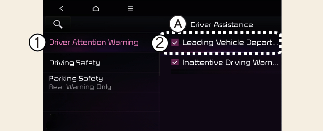
A: Driver Assistance
-
Driver Attention Warning
-
Leading Vehicle Departure Alert
-
If Leading Vehicle Departure Alert is selected, the function will inform the driver when a detected vehicle in front departs from a stop.