

Speed Limit
 OCL4M055124N |
|
While the vehicle is ON, tap on the infotainment system screen.
-
Country Selection: If navigation is not enabled, you can manually select the country from the menu. Please select the country you are currently driving in for proper functionality. (For Europe)
-
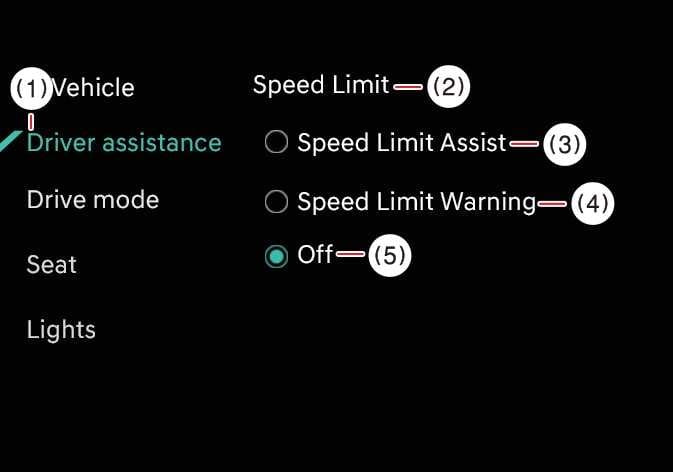
Speed Limit Assist: Intelligent Speed Limit Assist informs you of the posted speed limit and additional road signs, and warns you when you drive the vehicle faster than the speed limit. Intelligent Speed Limit Assist also recommends changing the set speed of the Manual Speed Limit Assist or Smart Cruise Control functions to help you stay within the posted speed limit.
-
Speed Limit Warning: Intelligent Speed Limit Assist informs you of the posted speed limit and additional road signs. Intelligent Speed Limit Assist also warns you when you drive the vehicle faster than the posted speed limit.
-
Off: Intelligent Speed Limit Assist turns OFF.
-
If Off is selected, the Speed Limit is automatically enabled when the vehicle is restarted. Stop the vehicle in a safe location before adjusting the Intelligent Speed Limit Assist settings.