

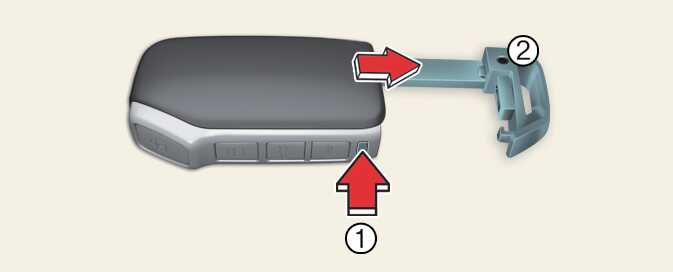
Removing the mechanical key from the smart key
-
Tab
-
Mechanical key
Operation
-
Press and hold the tab (1).
-
Pull the mechanical key (2) out.
-
If, for some reason, you happen to lose your smart key, you will not be able to start the vehicle. Tow the vehicle, if necessary, contact a professional workshop. Kia recommends that you contact an authorised Kia dealer/service partner.
-
A maximum of 2 smart keys can be registered to a single vehicle. If you lose a smart key, Kia recommends that you contact an authorised Kia dealer/service partner.
-
When the smart key does not work properly, open and close the door with the mechanical key. If you have a problem with the smart key, Kia recommends that you contact an authorised Kia dealer/service partner.
-
If the smart key is not moved for some time, the detection function(if equipped) for smart key operation will pause. Lift the smart key to activate the detection again.
-
Tinting the vehicle windows with film, especially metalized film, may interfere with receiving frequency transmitted by the smart key, reducing its operating range.