
Portable charge
Portable Charge can be used when AC Charge or DC Charge is not available by using household electricity.
The type of portable charger may vary according to your region.
Portable charging cable (Type A)
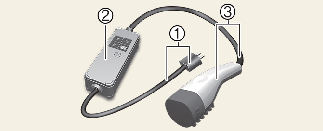
-
Code and Plug (Code set)
-
Control Box
-
Charging Cable and Charging Connector
Portable Charge can be used when AC Charge or DC Charge is not available by using household electricity.
Setting the charge level of the portable charger
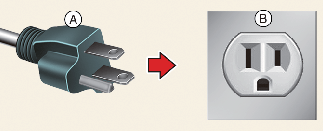
-
A: Plug
-
B: Electric Outlet
-
Check the rated current of the electric outlet prior to connecting the plug to the outlet.
-
Connect the plug to a household electric outlet.
-
Check the display window on the control box.
-
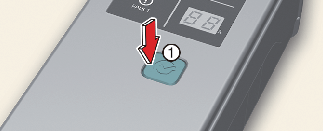
Press the button (1) on the back of the control box for 2 to 8 seconds to adjust the charge level. (Refer to charging cable type and example for setting the charge level.)
-
The charge level on the display window of the control box changes every time you press the button (1).
-
When setting the charge level is complete, start charging according to the portable charge procedure.
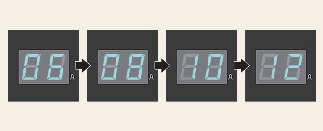
* Example for setting the ICCB charge level
* The example is only for reference and may vary according to the surrounding environment.
|
Outlet current |
ICCB charge level |
|---|---|
|
14-16A |
12A |
|
13-12A |
10A |
|
11-10A |
8A |
|
9-8A |
6A |

Please make sure that charge level selection matches the capacity of your circuit breaker to avoid blowing a fuse.
How to connect portable charger (ICCB: In-Cable Control Box)
-
Connect the plug to a household electric outlet.
-
A: Plug
-
B: Electric Outlet
-
-
Check if the power lamp (green) appears on the control box.

-
Depress the brake pedal and apply the parking brake.
-
Turn OFF all switches, shift to P (Park), and turn OFF the vehicle. If charging is initiated without the gear in P (Park), the charging will start after the gear is automatically shifted to P (Park).
-
Open the charging door.
For more details, refer to More Details.
-
Open the protection caps of the charging connector and the charging plug. Check if there are any foreign substances or dust.
-
Hold the charging connector handle and connect it to the vehicle charging inlet. Push for a firm connection. If the charging connector and charging terminal are not connected properly, this may cause a fire.
 NOTICE
If the charging connector and charging inlet are not connected properly, the connector may droop or vibrate. In this case, hold the charging connector handle and push for a firm connection.
-
Charging starts automatically (charging lamp appears).
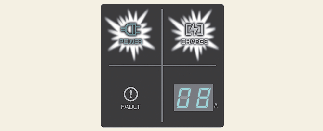
-
Check if the charging indicator light (
 ) of the high voltage battery in the instrument cluster is turned ON. Charging is not active when the charging indicator light
() is OFF. If the charging connector is not connected properly, reconnect the charging cable to charge it again.
) of the high voltage battery in the instrument cluster is turned ON. Charging is not active when the charging indicator light
() is OFF. If the charging connector is not connected properly, reconnect the charging cable to charge it again.

-
After charging has started, the estimated charging time is displayed on the instrument cluster for about 1 minute.
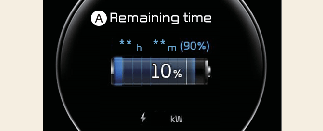
A: Remaining Time
If you open the driver door while charging, the estimated charging time is also displayed on the instrument cluster for about 1 minute. When scheduled charging or scheduled air conditioner/heater is set, the estimated charging time is displayed as "--".
Checking charging status
When charging the high voltage battery, the charge level can be checked from outside the vehicle.
For more details, refer to More Details.
-
If you cannot open the charging door due to freezing weather, tap lightly or remove any ice near the charging door. Do not try to forcibly open the charging door.
-
Select EV → setting icon on the screen → Charging connector locking mode in the infotainment system. The charging connector is locked in the inlet at a different period according to which mode is selected.
-
Always lock mode: The connector locks when the charging connector is plugged into the charging inlet.
-
Lock while charging mode: The connector locks when charging starts.
For more details, refer to More Details.
-
-
For you safety, start charging when the EV button is in the OFF position and the vehicle shifted to P (Park). After charging has started, you can use electrical components such as the radio by pressing the EV button to the START or ON position.
During charging, the gear cannot be shifted from P (Park) to any other gear.
-
Depending on the condition and durability of the high voltage battery, charger specifications, and ambient temperature, the time required for charging the battery may vary.
The infotainment system may change after software updates. For more information, refer to the manual provided in the infotainment system and the quick reference guide.
How to Set the Charge Level of the Portable Charger
-
A: Plug
-
B: Electric Outlet
-
Check the rated current of the electric outlet prior to connecting the plug to the outlet.
-
Connect the plug to a household electric outlet.
-
Check the display window on the control box.
-
Press the button (1) on the front of the control box for 2 to 8 seconds to adjust the charge level. (Refer to charging cable type and example for setting the ICCB charge level.)
-
The charge level on the display window of the control box changes every time you press the button (1).
-
When setting the charge level is complete, start charging according to the portable charge procedure.
Example for setting the ICCB charge level
The example is only for reference and may vary according to the surrounding environment.
|
Outlet current |
ICCB charge level |
|---|---|
|
14~16 A |
12 A |
|
12~13 A |
10 A |
|
10~11 A |
8 A |
|
8~9 A |
6 A |
Please make sure that charge level selection matches the capacity of your circuit breaker to avoid blowing a fuse.
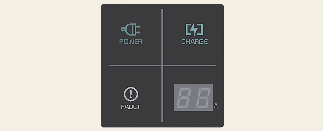
Charging status indicator lamp for portable charger
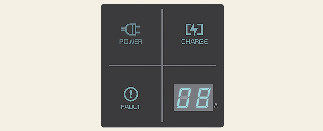
|
Indicator |
Details |
|
|---|---|---|
|
POWER |
On: Power on |
|
|
CHARGE |
On: Charge Blink: Current limit due to high plug temperature or high internal temperature |
|
|
FAULT |
Blink: Charging interrupted |
|
|
CHARGE LEVEL |
12 |
12 A |
|
10 |
10 A |
|
|
08 |
8 A |
|
|
06 |
6 A |
|
|
The charging current changes whenever the button (1) is pressed for less than 1 sec with the charger plugged into an electrical outlet but not the vehicle. Control box
|
||
Status/Diagnosis/Countermeasure
-
Charging connector plugged into vehicle (POWER Green ON)
-
Plug connected to an electric outlet (POWER Green ON)
While charging
-
Charge indicator (POWER Green ON/CHARGE Blue ON)
-
Charging current
Before plugging charging connector into vehicle (POWER Green ON, FAULT Red blink)

-
Abnormal temperature
-
ICCB (In-Cable Control Box) failure
Plugged into vehicle (POWER Green ON, FAULT Red Blink)
-
Diagnostic device failure
-
Current leakage
-
Abnormal temperature
Leakage current failure (POWER Green ON, FAULT Red Blink)
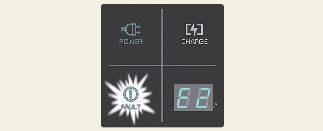
-
Disconnect and reconnect the power plug to clear the error.
Power saving mode
-
Charge level indicator is turned off if there is no status change for more than 1 minute.
How to disconnect portable charger (ICCB: In-Cable Control Box)
-
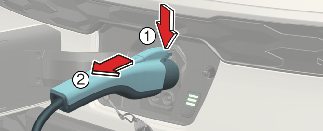
Hold the charging connector handle and pull it out.
-
Make sure to completely close the charging door.
-
Disconnect the plug from the household electric outlet. Do not pull the cable when disconnecting the plug.
A: Plug
B: Electric Outlet
-
Close the protection caps of the charging connector and the charging plug to protect them from foreign substances.
-
If the personal charging connector is used, store the connector in the cable compartment.
Precautions for portable charger (ICCB: In-Cable Control Box)
-
Use the portable charger that is certified by an authorized Kia dealer.
-
Do not try to repair, disassemble, or adjust the portable charger.
-
Do not use an extension cord or adapter.
-
Stop using immediately when failure occurs.
-
Do not touch the plug and charging connector with wet hands.
-
Do not touch the terminal part of the AC charging connector and the AC charging inlet on the vehicle.
-
Do not connect the charging connector to voltage that does not comply with building codes and regulations.
-
Do not use the portable charger if it is worn out, has wires exposed, or there exists any type of damage on the portable charger.
-
If the ICCB case and AC charging connector is damaged, cracked, or the wires are exposed in any way, do not use the portable charger.
-
Do not let children operate or touch the portable charger.
-
Keep the control box free of water.
-
Keep the normal charging connector or plug terminal free of foreign substances.
-
Do not step on the cable or cord. Do not pull the cable or cord and do not twist or bend it.
-
Do not charge when there is lightning.
-
Do not drop the control box or place a heavy object on the control box.
-
Do not place an object that can generate high temperatures near the charger when charging.
-
Charging with the worn out or damaged household electric outlet can result in a risk of electric shock. If you are in doubt as to the household electric outlet condition, have it checked by a licensed electrician.
-
Stop using the portable charger immediately if the household electric outlet or any components is overheated or you notice a burning odor.
-
When connecting the ICCB charging plug to an outlet, ensure you connect it to a grounded outlet.
-
If the outlet does not have a grounding terminal, have a qualified technician install a grounding terminal and then connect the plug.
To prevent charging cable theft, the charging connector cannot be disconnected from the inlet when the doors are locked or the charging connector is in the Always lock mode. Unlock all doors to disconnect the charging connector from the inlet.
However, if the vehicle is in the charging connector Lock while charging mode, the charging connector automatically unlocks from the inlet when charging is completed.
If the charging connector is disconnected while the release button is not pressed, the connector and the inlet may be damaged.
For more details, refer to More Details.
If the release button does not work even after the all doors are unlocked, pull the emergency lift cable in the motor compartment and press the release button in the connector to disconnect it from the vehicle. If the release button still does not work, contact an authorized Kia dealer.
Pressing the release button on the charging connector may result in interrupted charging and connector separation even when it is locked.
Portable charging cable (Type B)
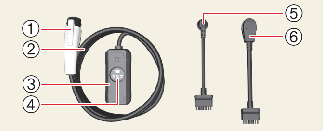
-
Charging Connector
-
Cable
-
Control Box (ICCB)
-
Display
-
Detachable Connector (5-15P)
-
Detachable Connector (14-50P)
|
Description |
Specifications |
|---|---|
|
Voltage |
120 V / 240 V AC single-phase |
|
Maximum Current |
12A MAX / 30A MAX with different input cord set. |
|
Frequency |
60 Hz |
|
Cable Length |
(6.1 m) |
|
Weight |
9.0 Ibs(4.1 kg) |
|
Operating Temperature |
-40 °F to +122 °F(-40 °C to +50 °C). |
|
Enclosure Type |
Type 6 (IP67) |
|
Ventilation |
Not Required |
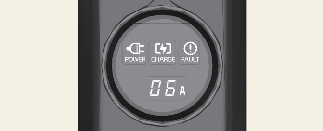
Charging status indicator lamp for portable charger
|
Indicator |
Details |
|
|---|---|---|
|
POWER |
 |
On: Power on |
|
CHARGE |
 |
On: Charge Blink: Current limit due to high plug temperature or high Internal temperature |
|
FAULT |
 |
Blink: Charging interrupt |
|
CURRENT |
 |
Display setting current or trouble shoot code |
|
CHARGE LEVEL |
30 |
30 A |
|
24 |
24 A |
|
|
20 |
20 A |
|
|
16 |
16 A |
|
|
12 |
12 A |
|
|
10 |
10 A |
|
|
08 |
8 A |
|
|
06 |
6 A |
|
|
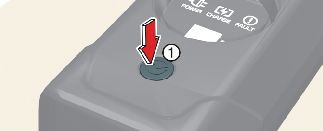
The charging current changes each time the button (1) is pressed, in the following sequence:
Control box
 |
||
How to connect detachable connector
Connect the detachable connector to control box controller socket.
Check the arrow on the top of the connector is no longer visible.
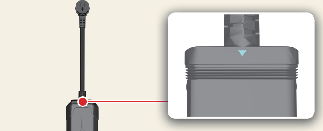
The power lamp (green) illuminates when the ICCB is powered on.
If “NC” is displayed on the ICCB display panel or if the arrow is still visible reconnect the detachable connector properly.
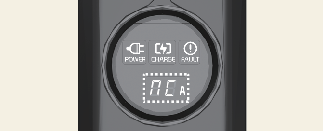
Trouble shooting status indicator lamp
|
Indicator |
Details |
||
|---|---|---|---|
 |
On : Error while charging / Error during self-diagnosis |
||
|
Error code |
item |
cause |
|
|
E1 |
Control pilot communication |
Vehicle communication error |
|
|
E2 |
leakage |
Current leakage |
|
|
E3 |
Charger error |
||
|
E4 |
Plug temperature |
Plug overtemperature warning |
|
|
E5 |
Plug temperature failure |
||
|
E6 |
Charger error |
||
|
E7 |
Overcurrent |
Charging overcurrent warning |
|
|
E8 |
Internal temperature |
Charger overheating |
|
|
E9 |
Charger error |
||
|
F1 |
Relay fusion |
Charger error |
|
|
F2 |
Ground Monitoring / interrupt |
Poor grounding of outlet |
|
|
A5 |
Charger error |
||
|
F3 |
Switched mode power supply power failure |
Switched mode power supply error (voltage failure) |
|
|
F4 |
Switched mode power supply error (abnormal voltage) |
||
|
F5 |
Control Pilot voltage error |
Control Pilot(-) voltage error |
|
|
F6 |
Control Pilot(+) voltage error |
||
|
F7 |
Temperature sensor error |
Plug temperature sensor error |
|
|
F8 |
PCB Internal temperature sensor error |
||
|
F9 |
Detachable plug temperature sensor error |
||
|
A1 |
Detachable plug temperature |
Detachable plug overtemperature warning |
|
|
A2 |
Charger error |
||
|
A3 |
Detachable plug state |
Charger error |
|
|
A4 |
Detachable plug search error |
||
|
FF |
Control box state |
Charger error |
|
How to connect portable charger (ICCB: In-Cable Control Box)
-
Turn OFF all switches, move the shift dial to P (Park), and turn OFF the vehicle.
-
Connect the plug to a household electric outlet.
-
A: Plug
-
B: Electric Outlet
-
-
Check if the power lamp (green) illuminates on the control box.

-
Depress the brake pedal and apply the parking brake.
-
Turn OFF all switches, shift to P (Park), and turn OFF the vehicle. If charging is initiated without the gear in P (Park), the charging will start after the gear is automatically shifted to P (Park).
-
Open the charging door.
For more details, refer to More Details.
-
Open the protection caps of the charging connector and the charging plug. Check if there are any foreign substances or dust.
-
Hold the charging connector handle and connect it to the vehicle charging inlet. Push the connector all the way in. If the charging connector and charging terminal are not connected properly, this may cause a fire.
NOTICEIf the charging connector and charging inlet are not connected properly, the connector may droop or vibrate. In this case, hold the charging connector handle and push it all the way in.
-
Charging starts automatically (charging lamp illuminates).

-
Check if the charging indicator light (
) of the high voltage battery in the instrument cluster is turned ON. Charging is not active when the charging indicator light
() is OFF. When the charging connector is not connected properly, reconnect the charging cable to charge it again.
-
After charging has started, the estimated charging time is displayed on the instrument cluster for about 1 minute.
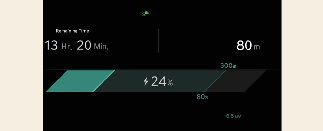
If you open the driver seat door while charging, the estimated charging time is also displayed on the instrument cluster for about 1 minute. When scheduled charging or scheduled air conditioner/heater is set, the estimated charging time is displayed as "--".
How to disconnect portable charging cable (ICCB: In-Cable Control Box)
-
Before disconnecting the charging connector, make sure the doors are unlocked. When the door is locked, the charging connector lock system will not allow disconnection. To prevent charging cable theft, the charging connector cannot be disconnected from the inlet when the doors are locked. However, if the vehicle is in the charging connector AUTO mode, the charging connector automatically unlocks from the inlet when charging is completed.
NOTICEIn order to disconnect the charging connector, unlock the doors to unlatch the charging connector lock system. If not, the charging connector and the vehicle's charging inlet may be damaged.
-
Hold the charging connector handle and pull it out.
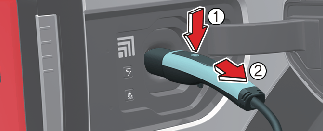
-
Make sure to securely close the charging door.
-
Disconnect the plug from the household electric outlet. Do not pull the cable when disconnecting the plug.
-
A: Plug
-
B: Electric Outlet
-
-
Close the protective cover for the charging connector so that foreign material cannot get into the terminal.
-
Put the charging cable inside the cable compartment to protect it.
Charging cable storage
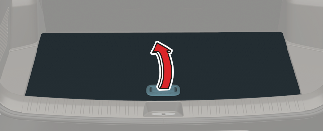
We recommend that the portable charger cable should be put in the storage box after use.
Precautions for portable charging cable (ICCB: In-Cable Control Box)
-
If the charger is worn out, exposed, or there exists any type of damage, charging may stop for your safety. Use another charger that works normally.
-
The charger operates from a 240V 30A MAX / 120V 12A MAX with different input cord set.
-
If you use an unauthorized portable charger (ICCB), this may disable charging due to compatibility issues.
-
This product must be grounded
-
For use with Electric Vehicles.
-
Ventilation not Required.
-
This device is intended only for charging vehicles not requiring ventilation during charging.
-
Be sure to use the dedicated plug, and ensure it is fully secured when using a detachable plug.
-
Do not use this with an extension cord.
-
Do not use extension cords, Multi-Outlets, Splitters, Ground Adapters, Surge Protectors, or similar components.
-
When connecting the detachable connector ICCB, connect it in the forward direction.
-
Do not disconnect the detachable connector ICCB while charging.
-
When storing the plug and cable separately, keep it safe from water, liquids, moisture, or snow.
-
Charging with the worn out or damaged household electric outlet can result in a risk of electric shock. If you are in doubt to the household electric outlet condition, have it checked by a licensed electrician.
-
Be careful not to throw or inadvertently impact the internal parts as they may be damaged.
-
Be careful not to drop this device on the ground while charging.
-
Varied with different input cord set.
-
Untie the charging cable before use.
-
If the ICCB case and AC charging connector is damaged, cracked, or the wires are exposed in any way, do not use the portable charging cable.
-
Do not plug in with several electronic products in multiple outlets together.
-
Do not modify or disassemble the provided plug.
-
Do not use the product, if the charging plug is damaged, cracked, broken or otherwise damaged.
-
Using a charging current exceeding the electrical outlet capacity may cause fire or damage to the components. If the outlet capacity is unknown, use the lowest charge level.
-
Disconnect the charging connector from the vehicle first before unplugging it from the wall outlet.
-
Do not connect to another outlet than the rated voltage.
-
Do not disconnect the portable charger from the wall outlet when the vehicle is charging.
-
Do not connect the portable charger into a power outlet that is not properly grounded.
-
Do not touch the terminal part of the AC charging connector and the AC charging inlet on the vehicle.
-
Do not charge when there is lightning.
-
Do not place an object that can generate high temperatures near the charger when charging.
-
Stop using the portable charging cable immediately if the household electric outlet or any components is overheated.
-
Stop using immediately if failure warning light occurs.
-
Do not drop the control box or place a heavy object on the control box.
To prevent property damage or injury due to fire or explosion, follow the instructions below.
-
Risk of electric shock. Do not disconnect under load.
-
The electrical outlet at home must comply with regulations and safely accommodate the voltage, current (amps), and power (patts) ratings specified on the portable charger. If not, the vehicle may not be charged or safety hazards, such as fire, may occur.
-
If the power distributor exceeds its capacity while charging the vehicle with a portable charger at home, the power to home may be cut off or a fire may occur.
-
If you charge the vehicle with household electricity, you are charged electricity bill according to the home rate system, not the electric vehicle rate system.
-
Only use a genuine Kia portable charger. If not, the vehicle may not be charged.
-
Do not let children operate or touch the portable charger. Doing so may lead to unexpected accidents.
-
Immediately stop charging if you discover abnormal conditions, such as odor or smoke.
-
Do not operate the portable charger in temperatures outside its operating range of -40 °F to +122 °F (-40 °C to +50 °C).
-
Store the mobile connector in a clean dry place in temperatures between -40 °F and +185 °F (-40 °C and +85 °C).
-
Do not wrap the charging cable around this device when storing.
-
Risk of electric shock.
-
Do not try to repair, disassemble, or adjust the portable charging cable.
-
A qualified technician should service parts.
-
Do not use this product if there is any damage to the unit.
-
Connect only to properly grounded outlets.

-
Do not touch, connect or pull the plug with wet hands, and keep it free of water, liquid, moisture or snow. It may cause electric shock, serious injury or death.
-
Do not let children operate or touch the plug.