Map lamp
Operation
-
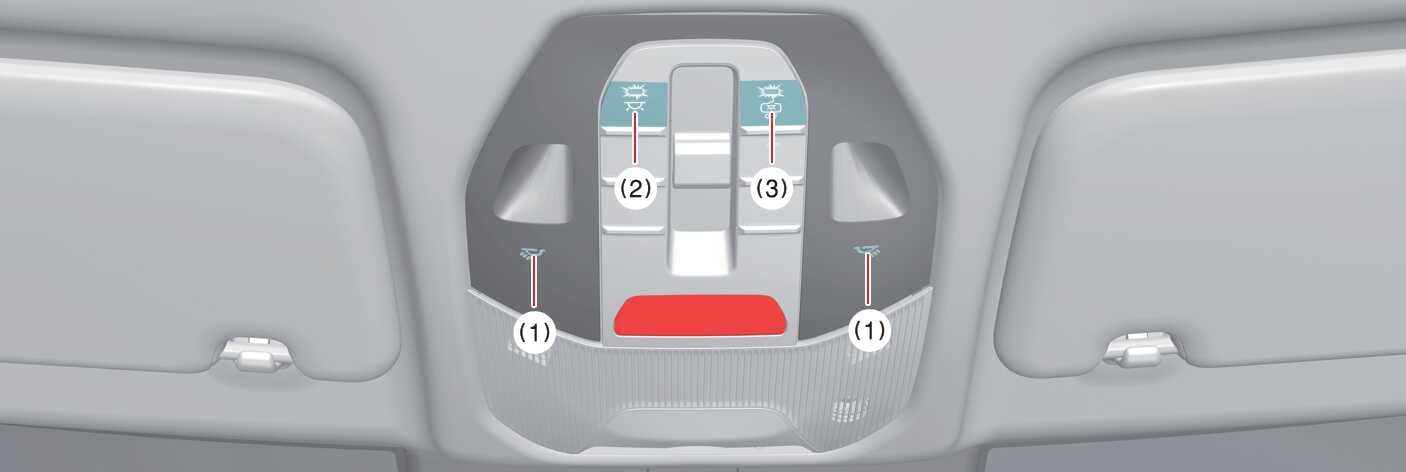
If you press the button at each location (1), the map lamp of the corresponding location turns on, and if you press it again, the lamp turns off.
If you press and hold the corresponding button for about 1.5 seconds or more whilst the lamp is on, the brightness of the left and right map lamps changes, and if you release the button at the desired brightness, the set brightness is saved.
-
The front and rear seat lamps turn on, and pressing again turns all lamps off.
If you press and hold the corresponding button for about 1.5 seconds or more whilst the status indicator is on, the brightness of the front and rear seat lamps changes simultaneously. When you release the button at the desired brightness, the set brightness is saved.
To reset the overall brightness of the interior lights, press and hold for more than 3 seconds whilst the status indicator is off, the lights blink twice and are initialized.
-
When DOOR mode OFF (3) indicator light is off (DOOR mode)
-
The map lamp and room lamp come on approximately 30 seconds.
-
When a door is opened.
-
When doors are unlocked with a smart key as long as the doors are not opened.
-
-
The map lamp and room lamp will stay on
-
If a door is opened with the vehicle in the OFF position. (20 minutes)
-
If the door is opened with the vehicle in the POWER ON or DRIVE READY position. (continuously)
-
-
The map lamp and room lamp will go out
-
If the vehicle is changed to the POWER ON or DRIVE READY position or all doors are locked. (immediately)
-
When DOOR mode OFF (3) indicator light is on (ROOM mode)
-
The operating condition of the interior light interlocked with the opening and closing of the door is released.
-
The DOOR mode and ROOM mode cannot be selected at the same time.