Camera Settings
 OSV054346R |
|
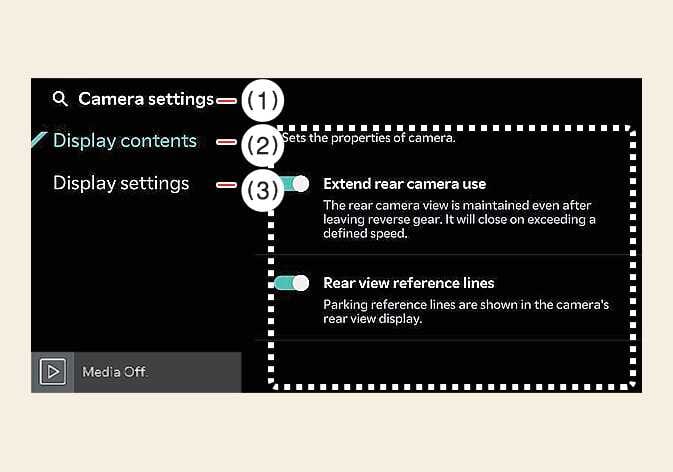
With the vehicle is in DRIVE READY, select the settings icon ( ) on the screen or from the infotainment system screen to change the Rear View Monitor
settings.
) on the screen or from the infotainment system screen to change the Rear View Monitor
settings.
Extend rear camera use
If Extend rear camera use is selected, the rear camera is displayed even when shifting from R (Reverse) to N (Neutral) or D (Drive).
Rearview reference lines
If Rear view reference lines in the display information is selected, Rear view reference lines and Top Rear View Parking Guidance are displayed in the rear monitor.
Display settings
You can set the brightness (day/night) and contrast of the camera image in Display settings.
The setting menu may not be available for your vehicle depending on the vehicle specifications.
The horizontal lines of the Rear View Parking Guidance indicate distances of 0.5 m (20 in), 1 m (40 in) and 2.3 m (91 in) from the vehicle. The horizontal scale of the Top View Parking Guidance indicates distances of tailgate opening distance and 1.5 m (60 in) from the vehicle.