

User settings mode
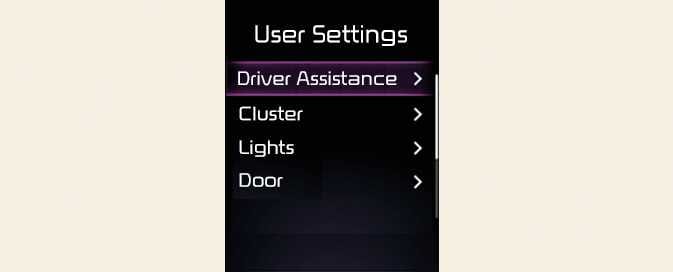 ONQ5031372L |
In this mode, you can change the settings of the instrument cluster, doors, lamps, etc.
-
Driver Assistance
-
Cluster
-
Light
-
Door
-
Convenience
-
Units
-
Language
-
Reset
The information provided may differ depending on which functions are applicable to your vehicle.
Shift to P to edit settings/Engage parking brake to edit settings
This warning message appears if you try to adjust the User Settings while driving.
-
Dual Clutch Transmission
For your safety, change the User Settings after parking the vehicle, applying the parking brake and moving the shift lever to P (Park).
-
Manual Transmission
For your safety, change the User Settings after engaging the parking brake.
1. Driver Assistance (if equipped)
|
Items |
Explanation |
|---|---|
|
Driving Convenience |
For more details, refer to Smart Cruise Control (SCC).
|
|
Speed Limit |
For more details, refer to Intelligent Speed Limit Assist (ISLA). |
|
Warning Methods |
To adjust the Warning Volume |
|
Driver Attention Warning |
For more details, refer to Driver Attention Warning (DAW). |
|
Driving Safety |
For more details, refer to Forward Collision-Avoidance Assist (FCA) (Front Camera Only), Forward Collision-Avoidance Assist (FCA) (Sensor Fusion).
For more details, refer to Lane Keeping Assist (LKA).
For more details, refer to Blind-Spot Collision-Avoidance Assist (BCA).
For more details, refer to Safe Exit Warning (SEW). |
|
Parking Safety |
For more details, refer to Rear Cross-Traffic Collision-Avoidance Assist (RCCA). |
The information provided may differ depending on which systems are applicable to your vehicle.
2. Cluster (if equipped)
|
Items |
Explanation |
|---|---|
|
Theme Selection |
|
|
AUTO STOP Timer |
|
|
Wiper/Lights Display |
To activate or deactivate Wiper/Lights Display. |
|
Traffic Signs |
To activate or deactivate Traffic Signs. |
|
Icy Road Warning |
To activate or deactivate Icy Road Warning. |
|
Welcome Sound |
To activate or deactivate Welcome Sound. |
The information provided may differ depending on which functions are applicable to your vehicle.
3. Lights (if equipped)
|
Items |
Explanation |
|---|---|
|
Illumination |
|
|
Ambient Light Color |
To select the Ambient Light Color. |
|
One Touch Turn Signal |
For more details, refer to Lighting. |
|
Headlight Delay |
To activate or deactivate the headlight delay function. |
|
High Beam Assist |
To activate or deactivate High Beam Assist. |
The information provided may differ depending on which functions are applicable to your vehicle.
4. Door (if equipped)
|
Items |
Explanation |
|---|---|
|
Automatically Lock |
|
|
Automatically Unlock |
|
|
Smart Tailgate |
To activate or deactivate Smart Tailgate |
The information provided may differ depending on which systems are applicable to your vehicle.
5. Convenience (if equipped)
|
Items |
Explanation |
|---|---|
|
Rear Occupant Alert |
To activate or deactivate the Rear Occupant Alert function. |
|
Service Interval |
|
|
Welcome Light |
To select the welcome light function. |
|
Welcome Mirror |
To select the welcome mirror function. |
|
Welcome Mirror/Light |
To select the welcome mirror/light function. |
|
Auto Rear Wiper (in R) |
To activate or deactivate the Auto Rear Wiper function will be activated. |
The information provided may differ depending on which functions are applicable to your vehicle.
6. Units (if equipped)
|
Items |
Explanation |
|---|---|
|
Speed Unit |
To select the Speed unit. |
|
Temperature Unit |
To select the Temperature unit. |
|
Fuel Economy Unit |
To select the Fuel economy unit. |
|
Tire Pressure Unit |
To select the Tire Pressure Unit |
The information provided may differ depending on which functions are applicable to your vehicle.
7. Language
|
Items |
Explanation |
|---|---|
|
Language |
|
8. Reset
|
Items |
Explanation |
|---|---|
|
Reset |
|