

Forward Collision-Avoidance Assist settings
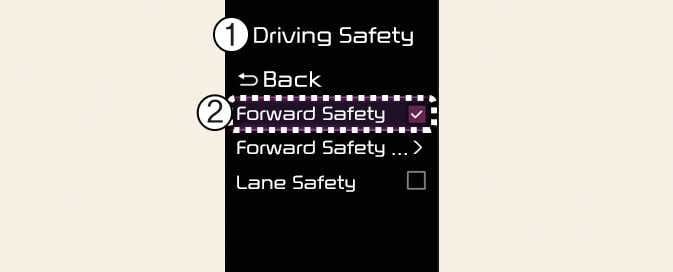
Forward Safety
 OSG2EV052165L |
 OJAPE073111L |
-
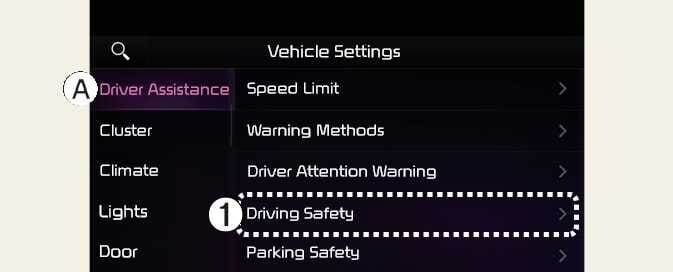
Driving Safety
-
Forward Safery
With the vehicle on, select User on the instrument cluster or on the infotainment system. The initial warning activation timing of Forward Collision-Avoidance Assist can be changed.
-
Forward Safety: Depending on the collision risk levels, an audible warning will sound, and the braking will be assisted. If the following menu is deactivated, Forward Collision-Avoidance Assist will turn off and the warning light (
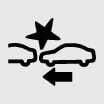 ) will appear on the cluster.
The driver can monitor Forward Collision-Avoidance Assist On/Off status from the Settings
menu. If the warning light () remains ON when
Forward Collision-Avoidance Assist is on, have your vehicle inspected by a
professional workshop. Kia recommends visiting an authorized Kia dealer or service
partner.
When the vehicle is restarted, Forward Collision-Avoidance Assist will always turn on. However, if function is deselected, the driver should always be aware of the surroundings and drive safely.
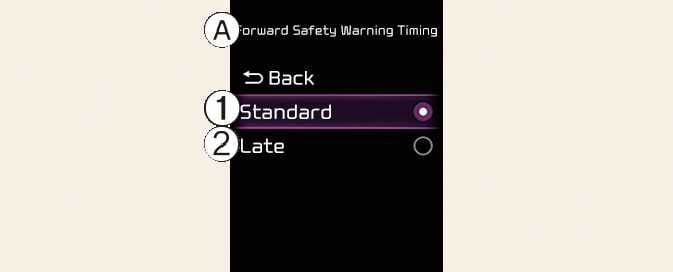
Forward Safety Warning Timing
 OJAPE053134L |
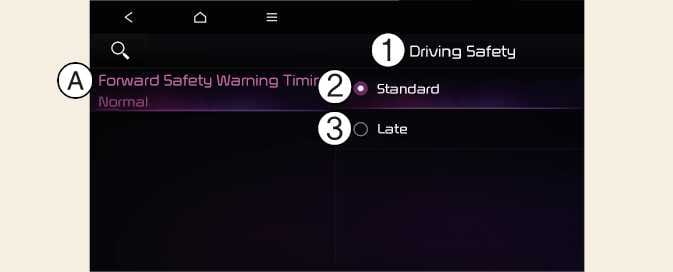
A: Forward Safety Warning Timing
|
 OSG2EV054229L |
A: Forward Safety Warning Timing
|
With the vehicle on, select User on the instrument cluster or on the infotainment system to change the initial warning activation timing of Forward Collision-Avoidance Assist.
-
Use Standard in normal driving conditions. If the Warning Timing seems sensitive, change it to Late.
-
If Late is selected, Forward Collision-Avoidance Assist, warns the driver more slowly.
-
Even though Standard is selected for Forward Safety Warning Timing, if the front vehicle suddenly stops, the initial warning activation time may seem late.
-
Select Late for Forward Safety Warning Timing when traffic is light and when driving speed is slow.
If the vehicle is restarted, Forward Safety Warning Timing will maintain the last setting.