
Forward Collision-Avoidance Assist setting
Forward Safety
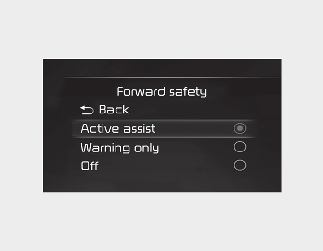
With the ENGINE START/STOP button in the On position, select 'Settings → Driver Assistance → Forward Safety' on the instrument cluster or 'Settings → Vehicle → Driver Assistance → Forward Safety' on the infotainment system to set whether to use each function.
-
If ‘Active Assist’ is selected, Forward Collision-Avoidance Assist will warn the driver with a warning message, an audible warning and steering wheel vibration (if equipped) depending on the collision risk levels. Braking assist will be applied in accordance with the collision risk.
-
If ‘Warning Only’ is selected, Forward Collision-Avoidance Assist will warn the driver with a warning message, an audible warning and steering wheel vibration (if equipped) depending on the collision risk levels.
-
If ‘Off’ is selected, Forward Collision-Avoidance Assist will off. The
 warning light will illuminate on the cluster.
The driver can monitor Forward Collision-Avoidance Assist On/Off status from the settings menu. If the warning light remains On when Forward Collision-Avoidance Assist is On, have the function checked by a professional workshop.
Kia recommends to visit an authorised Kia dealer/service partner.

-
When the engine is restarted, Forward Collision-Avoidance Assist will always turn on.
-
If 'Off' is selected from the settings menu, Forward Collision-Avoidance Assist will not operate so the driver should always be aware of the surroundings and drive safely.

-
If 'Warning Only' is selected, braking is not assisted.
-
Steering wheel vibration (if equipped) can be turned on or off from the settings menu.

Forward Collision-Avoidance Assist will turn off when ESC is turned off by pressing and holding the ESC OFF button and the
warning light will illuminate.
Warning Timing
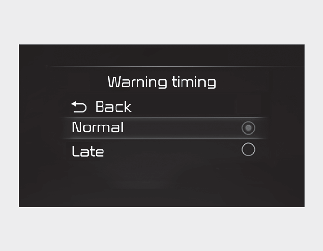
With the ENGINE START/STOP button in the On position, select “User Settings → Driver Assistance → Warning Timing” at the LCD display or infotainment system to change the initial warning activation time for Forward Collision-Avoidance Assist.
-
Normal: Use Normal in normal driving conditions. If the Warning Timing seems sensitive, change it to Late.
-
Late: If Late is selected, Forward Collision-Avoidance Assist, warns the driver more slowly.
Warning Methods
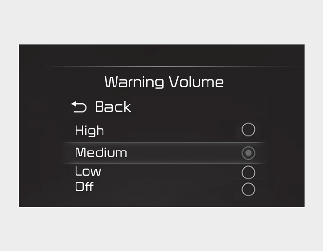
You can adjust the Warning Methods with the ignition switch or ENGINE START/STOP button in the ON position.
-
Warning Volume: Select ‘User Settings → Driver Assistance → Warning Volume’ on the LCD display or ‘Settings → Vehicle → Driver Assistance → Warning Methods’ on the Infotainment system.
-
Haptic warning: Select 'User settings → Driver assistance → Haptic warning' on the instrument cluster or select 'Settings → Vehicle → Driver assistance → Warning methods → Haptic warning' on the infotainment system, and set the steering wheel vibration warning. (if equipped)
-
Driving Safety Priority : Select ‘Settings → Vehicle → Driver Assistance → Warning Methods → Driving Safety Priority’ on the Infotainment system. For safe driving, the audio volume will temporarily decrease to warn the driver with the audible warning.
-
Ensure that Warning Methods you have set may apply to the warning volume of other Driver Assistance systems.
-
Warning Methods will maintain its last setting even if the vehicle is restarted.
-
The setting menu may not be available for your vehicle depending on the vehicle features and specifications.
-
With the warning volume is 0, if you deselect Haptic warning, the warning volume will be automatically adjusted with volume 2.
-
With the Haptic warning is deselected, if you adjust the warning volume to 0, the Haptic warning will be automatically selected.
-
The setting of the Warning Timing applies to all functions of Forward Collision-Avoidance Assist.
-
Even though ‘Normal’ is selected for Warning Timing, if the front vehicle suddenly stops, the warning may seem late.
-
Select ‘Late’ for Warning Timing when traffic is light and when driving speed is slow.
-
If the engine is restarted, Warning Timing will maintain the last setting.
-
If you change the Warning Timing, the Warning Timing of other Driver Assistance system may change.