
Reverse Parking Collision-Avoidance Assist settings
Parking Safety

With the engine on, select or deselect 'Driver Assistance → Parking Safety' from the Settings menu to set whether or not to use each function.
-
If 'Rear Active Assist' is selected, the function will be in the ready status. The function will warn the driver and assist with braking when a collision with a pedestrian or an object is imminent.
-
If 'Rear Warning Only' (or 'Rear warning only') is selected, the function will warn the driver when a collision with a pedestrian or an object is imminent. Braking will not be assisted.
-
If 'Off' is selected, the function will turn off.
-
Press the Parking Safety (
 ) button for 2 seconds and more to set whether or not to use 'Rear Active Assist' or 'Rear Warning Only'.
Warning Timing
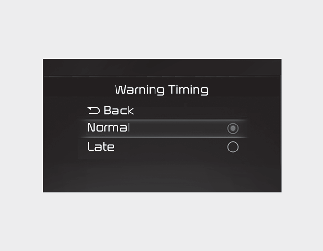
With the engine on, select 'Driver Assistance → Warning Timing' from the Settings menu to change the initial warning activation time for Reverse Parking Collision-Avoidance Assist.
If 'Normal' is selected, the Warning Timing is set to Normal. If 'Normal' feels sensitive, change the settings to 'Late'.
If you change the Warning Timing, the warning time of other Driver Assistance systems may change.
Warning Methods
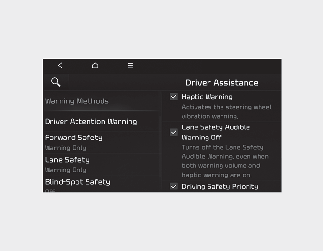
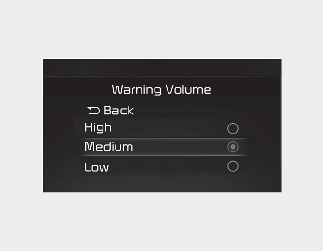
You can adjust the Warning Methods with the ignition switch or ENGINE START/ STOP button in the ON position.
-
Warning Volume : Select 'User Settings → Driver Assistance → Warning Volume' on the LCD display or 'Settings → Vehicle → Driver Assistance → Warning Methods → Warning volume' on the Infotainment system.
Even if '0' or 'Off' is selected, the function's Warning Volume will not turn off but the volume will sound as '1' or 'Low'
-
Steering Wheel Vibration Warning: Select 'User Settings → Driver Assistance → Haptic warning' on the LCD display or 'Settings → Vehicle → Driver Assistance → Warning Methods → Haptic warning' on the Infotainment system.
If you change the warning volume, the Warning Volume of other Driver Assistance systems may change.

-
Ensure that warning sound you have set may apply to the warning volume of other driver assistance systems.
-
Warning Methods will maintain its last setting even if the vehicle is restarted.
-
With the Warning Volume in '0' or 'Off', if you turn off Steering Wheel Vibration Warning, the Warning Volume will be activated with volume '2' or 'Medium'.
-
With the Steering Wheel Vibration Warning off, if you adjust the Warning Volume to '0' or 'Off', the Steering Wheel Vibration Warning will be activated.
-
The setting menu may not be available for your vehicle depending on the vehicle features and specifications.
-
Descriptions of each driver assistance system may be slightly different from the owner's manual after updating the software of your infotainment system. In this case, scan the QR code in the infotainment system manual to access the web manual to review the changes.
-
Depending on your update, the menu may be displayed as 'Warning Sound' or 'Warning Methods'.