Scheduled charging
Simple operation
-
Set the charging schedule for your vehicle from the infotainment system, Kia App, or Kia Connect app.
Operation
-
Set the charging schedule for your vehicle on the Infotainment system, Kia App, or Kia Connect app.
-
Scheduled charging operates only with a slow charger or a portable charger (ICCB: In Cable Control Box).
-
When scheduled charging is set and a slow charger or portable charger (ICCB: In Cable Control Box) is connected, the charging status indicator on the charging door will appear orange.
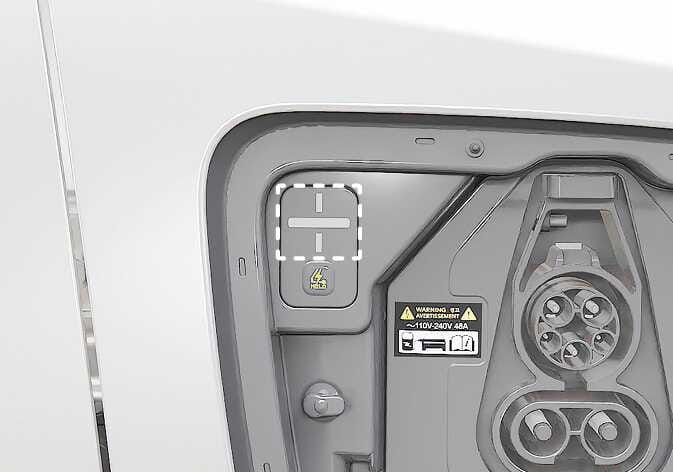 N_CT25Q036
 -
When scheduled charging is set, connecting a slow charger or portable charger (ICCB: In Cable Control Box) will not start charging immediately.
-
To start charging immediately, disable the scheduled charging setting through the infotainment system or the Kia App, or Kia Connect app.
-
You can also press and hold the immediate charging switch for about 2 seconds to cancel scheduled charging and start charging immediately.
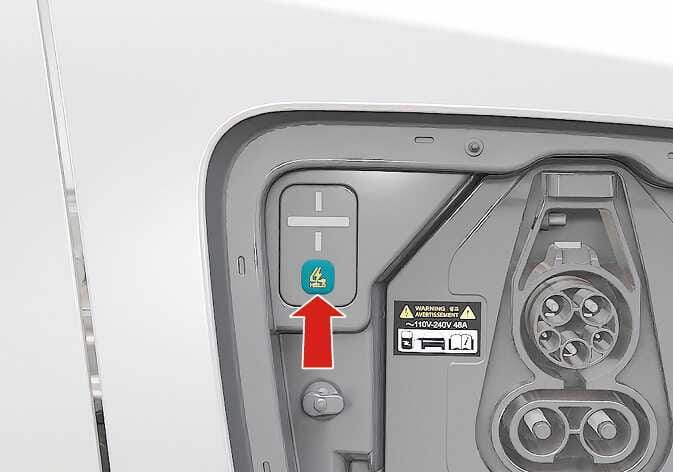 N_CT25Q037
 -
If scheduled charging is set, the system calculates the start time automatically. In some cases, charging may begin immediately after the charger is connected.
Operating conditions
-
Following charger type is connected
-
AC charger
-
Portable charger (ICCB)*
*: Depending on your region, this cable may not be provided in your vehicle.
-
The infotainment system may change after software updates. For more information, refer to the manual provided in the infotainment system and the quick reference guide.