

User Settings mode: (if equipped)
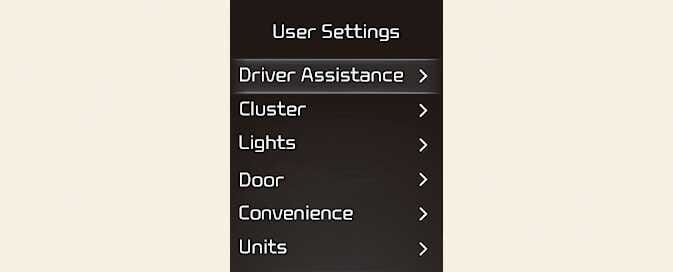
In this mode, you can change the settings of the instrument cluster, doors, lamps, etc.
The information provided may differ depending on which functions are applicable to your vehicle.
This warning message appears if you try to adjust the User Settings while driving.
-
Automatic Transmission
For your safety, change the User Settings after parking the vehicle, applying the parking brake and moving the shift lever to P (Park).
-
Manual Transmission
For your safety, change the User Settings after engaging the parking brake.
|
Items |
Explanation |
|---|---|
|
Speed Limit |
|
|
Warning Methods |
|
|
Driver Attention Warning |
To select the function. For more details, refer to Driver Attention Warning (DAW). |
|
Driving Safety |
For more details, refer to Forward Collision-Avoidance Assist (FCA) (Front Camera Only)/ Forward Collision-Avoidance Assist (FCA) (Sensor Fusion).
For more details, refer to Lane Keeping Assist (LKA).
For more details, refer to Blind-Spot Collision-Avoidance Assist (BCA).
For more details, refer to Safe Exit Warning (SEW). |
|
Parking safety |
For more details, refer to Rear Cross-Traffic Collision-Avoidance Assist (RCCA). |
The information provided may differ depending on which systems are applicable to your vehicle.
|
Items |
Explanation |
|---|---|
|
Theme Selection |
|
|
AUTO STOP Timer |
|
|
Wiper/Lights Display |
To activate or deactivate the Wiper/Lights Display function. |
|
Traffic Signs |
To activate or deactivate the Traffic Signs function. |
|
Icy Road Warning |
To activate or deactivate the Icy Road Warning function. |
|
Cluster Voice Guidance Volume |
|
|
Welcome Sound |
To activate or deactivate the Welcome Sound function. |
The information provided may differ depending on which functions are applicable to your vehicle.
|
Items |
Explanation |
|---|---|
|
Illumination |
|
|
One Touch Turn Signal |
For more details, refer to Lighting. |
|
Headlight Delay |
To activate or deactivate the Headlight Delay function. |
|
High Beam Assist |
To activate or deactivate the High Beam Assist function. For more details, refer to High Beam Assist (HBA). |
The information provided may differ depending on which functions are applicable to your vehicle.
|
Items |
Explanation |
|---|---|
|
Automatically Lock |
|
|
Automatically Unlock |
|
|
Horn Feedback |
To activate or deactivate the Horn Feedback system. |
|
Remote Window |
To activate or deactivate the remote window control. |
The information provided may differ depending on which systems are applicable to your vehicle.
|
Items |
Explanation |
|---|---|
|
Rear Occupant Alert |
|
|
Service Interval |
|
|
Welcome Light |
To select the welcome light function. |
|
Welcome Mirror |
To select the welcome mirror function. |
|
Welcome Mirror/Light |
To select the welcome mirror/light function. |
|
Auto Rear Wiper |
|
The information provided may differ depending on which functions are applicable to your vehicle.
|
Items |
Explanation |
|---|---|
|
Speed Unit |
To select the Speed unit. |
|
Temperature Unit |
To select the Temperature unit. |
|
Fuel Economy Unit |
To select the Fuel economy unit. |
|
Tire Pressure Unit |
To select the Tire Pressure Unit |
The information provided may differ depending on which functions are applicable to your vehicle.
|
Items |
Explanation |
|---|---|
|
Reset |
You can reset the menus in the User Settings mode. All menus in the User Settings mode are reset to factory settings, except language and service interval. |
The information provided may differ depending on which functions are applicable to your vehicle.