

Wireless smartphone charging
-
Remove any object on the smartphone charging pad including the smart key. If there is any foreign object on the pad other than a smartphone, the wireless charging function may not operate properly.
-
Place the smartphone on the center of the wireless charging pad.
-
Select SetupVehicleConvenienceMobile Phone Wireless Charging Indicator on the infotainment system to choose the indicator Type 1 or Type 2.
The indicator light will change as follows:
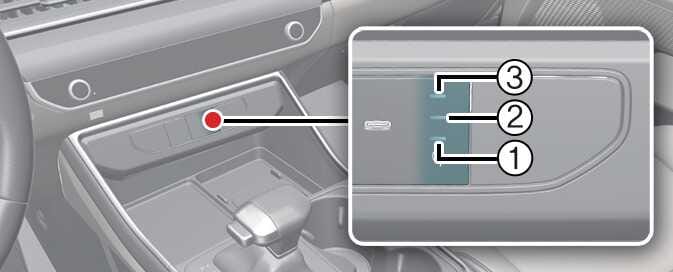 OKA4034480N
Operation Status
Indicator
Type 1
Type 2
Charging
Orange
1, 2, 3
Green
Complete
Green
1, 2, 3
Failure
Orange blinking
1, 2, 3
-
Select SetupVehicleConvenienceWireless Charging System for Mobile Devices on the infotainment system to turn on or off the wireless smartphone charging system.
If the wireless charging does not work, gently move your smartphone around the pad until the charging indicator light turns yellow. Depending on the smartphone, the charging indicator light may not turn green even after the charging is complete.
If the wireless charging is not functioning properly, the orange light will blink and flash for ten seconds then turn off. In such cases, remove the smartphone from the pad and replace it on the pad again, or double check the charging status.
If you leave the smartphone on the charging pad when the vehicle ignition is in OFF, the vehicle will alert you through warning messages and sound (applicable for vehicles with voice guidance function) after the 'Goodbye' function on the instrument cluster ends.
For some manufacturers' smartphones, the system may not warn you even though the smartphone is left on the wireless charging unit. This is due to the particular characteristic of the smartphone and is not a malfunction of the wireless charging system.
Distracted driving
Driving while distracted can result in a loss of vehicle control that may lead to an accident, severe bodily injury, or death. Your primary responsibility is in the safe and legal operation of your vehicle. Any use of handheld devices, other equipment, or vehicle systems that take your eyes, attention, and focus away from the safe operation of your vehicle are not permissible by law. These should never be used during the operation of your vehicle.
-
It's normal for your phone to warm up while charging, but using apps like Android Auto or Apple CarPlay can cause it to heat up faster, potentially delaying or stopping the charging process due to overheating. This is not an issue with the wireless charging system, so please remove the smartphone from the charging pad to help it cool down.
-
During wireless charging, an internal fan operates to prevent overheating. Fan noise may sound.
The wireless charging speed for certain smartphones with built-in protection may decrease or stop, depending on the wireless charging policy and product specifications set by each manufacturer, so you can check your smartphone's maximum wireless charging speed in the manufacturer's wireless charging manual.
Liquid in wireless charging system
To prevent liquid from damaging the wireless smartphone charging system in your vehicle, be sure not to spill liquid over the charging system.
Metal in wireless charging system
If any metallic object such as a coin is located between the wireless charging system and the smartphone, the charging may be disrupted. Also, the metallic object may heat up and potentially damage the charging system. If there is any metallic object between the smartphone and the charging pad, immediately remove the smartphone. Remove the metallic object after it has cooled down.
-
When the interior temperature of the wireless charging system rises above a set temperature, the wireless charging will cease to function. After the interior temperature drops below the threshold, the wireless charging function will resume.
-
The wireless charging may not function properly when there is a heavy accessory cover on the smartphone.
-
The wireless charging will stop when using the wireless smart key search function to prevent radio wave disruption.
-
The wireless charging will stop when the smart key is moved out of the vehicle with the vehicle in ON.
-
The wireless charging will stop when any of the doors are opened (applicable for vehicles equipped with smart keys).
-
The wireless charging will stop when the vehicle is turned OFF.
-
The wireless charging will stop when the smartphone is not in complete contact with the wireless charging pad.
-
Items equipped with magnetic components such as credit card, telephone card, bankbook or any transportation ticket may become damaged during wireless charging.
-
Place the smartphone on the center of the charge pad for best results. The smartphone may not charge when placed near the rim of the charging pad. When the smartphone does get charged, it may heat up excessively.
-
For smartphones without built-in wireless charging system, an appropriate accessory has to be equipped in order to use the vehicle's wireless charging system.
-
Certain smartphones may display messages on a weak current. This is due to the particular characteristics of the smartphone, and does not imply a malfunction of the wireless charging function.
-
The indicator light of some manufacturers' smartphones may still be orange after the smartphone is fully charged. This is due to the particular characteristic of the smartphone and not a malfunction of the wireless charging.
-
When any smartphone without a wireless charging function or a metallic object is placed on the charging pad, a small noise may sound. This small noise is due to the vehicle discerning compatibility of the object placed on the charging pad. It does not affect your vehicle or the smartphone in any way.
-
The wireless cellular phone charging system may not support certain cellular phones, which are not verified for the Qi® specification (
 ).
). -
When placing your smartphone on the charging pad, position the phone in the middle of the pad for maximum efficiency.
If your smartphone is off to the side, the charging speed may slow down, and in some cases, your smartphone may experience higher heat conduction.
-
When charging some smartphones with a self-protection feature, the wireless charging speed may decrease, and the charging may stop.
-
A smartphone that supports the wireless charging can only be charged wireless.
-
The wireless charging pad has an internal cooling system which can create noise to keep your phone cool while it charges.