

Starting the engine with smart key
When you open the vehicle doors or press the ENGINE START/STOP button, your vehicle will check for the smart key.
If the smart key is not in your vehicle, the  indicator and the message “Key is not in your Kia” appear on the instrument cluster and infotainment system screen. If all doors are closed, the chime sounds for 5 seconds. The indicator or chime turns OFF while your vehicle is moving. Always have the smart key with you.
The engine only starts when the smart key is in your vehicle. Never allow a child or any person who is unfamiliar with your vehicle to touch the ENGINE START/STOP button or related parts. Pressing the ENGINE START/STOP button while the smart key is in your vehicle may result in unintended engine operation or vehicle movement.
If the engine stalls while your vehicle is in motion, do not attempt to shift the gear to P (Park). If traffic and road conditions permit, you may shift the gear to N (Neutral) while your vehicle is still moving, and press the ENGINE START/STOP button to attempt to restart the engine.
-
If the battery is weak or the smart key does not work correctly, you can start the engine by pressing the ENGINE START/STOP button directly with the smart key.
When you press the ENGINE START/STOP button directly with the smart key, the smart key should contact the button at a right angle.
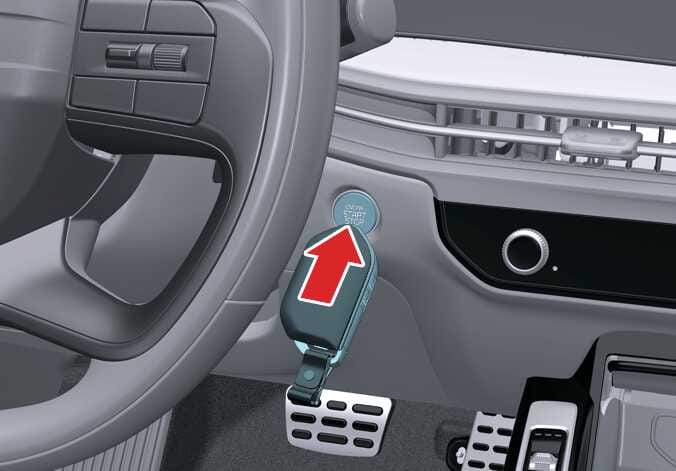 OMQ4A045045
 -
If the brake light fuse is blown, you cannot start the engine normally.
Replace the fuse with a new one. If this is not possible, start the engine by pressing the ENGINE START/STOP button in the ACC position for 10 seconds. The engine can start without the brake pedal engaged, but for your safety, always engage the brake pedal before starting the engine.
-
Do not press the ENGINE START/STOP button for more than 10 seconds except when the brake light fuse is blown.