

Setting features
Forward Safety
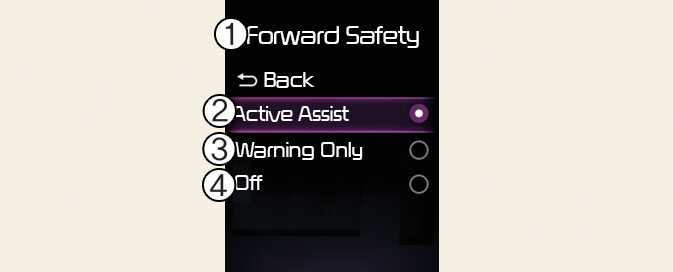
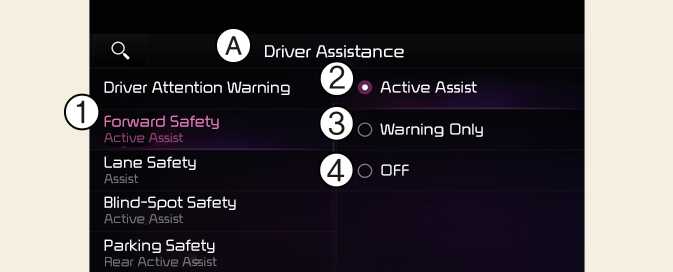
A: Driver Assistance
-
Forward Safety
-
Active Assist
-
Warning Only
-
Off
With the vehicle on, select Settings→ Driver Assistance → Forward Safety from the User Settings menu or select Settings→ Vehicle → Driver Assistance → Forward Safety from the infotainment system to set whether or not to use each function.
-
Active Assist: Forward Collision-Avoidance Assist will warn the driver with a warning message, an audible warning depending on the collision risk levels. Braking assist will be applied depending on the collision risk.
-
Warning Only: Forward Collision-Avoidance Assist will warn the driver with a warning message and an audible warning depending on the collision risk levels. Braking will not be assisted. The driver must apply the brake pedal if necessary.
-
Off: Forward Collision-Avoidance Assist will turn off. The warning light (
 ) will appear on the cluster.
The driver can monitor Forward Collision-Avoidance Assist ON/OFF status from the Settings menu. If the warning light (
 ) remains ON when Forward Collision-Avoidance Assist is ON, have the vehicle inspected by an authorized Kia dealer.
When the vehicle is restarted, Forward Collision-Avoidance Assist will always turn on. However, if Off is selected, the driver should always be aware of the surroundings and drive safely.
If Warning Only is selected, braking is not assisted.
Forward Collision-Avoidance Assist will turn off when ESC is turned off by pressing and holding the ESC OFF button. The warning light (
 ) will appear on the cluster.