

Lane Safety
 OCL4M055120N |
|
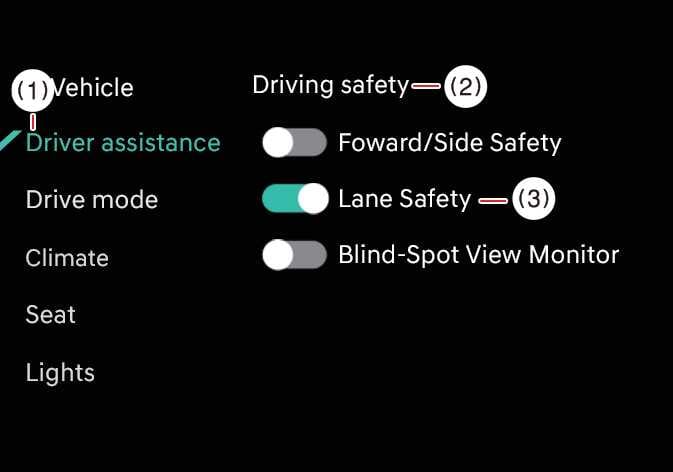
While the vehicle is ON, tap on the infotainment system screen to change the Lane Safety settings.
Lane Safety: When a potential lane departure is detected, the system assists with steering to prevent you from leaving the lane. If you leave the lane, the system alerts you with an audible sound and steering wheel vibration. If you deselect Lane Safety, the yellow indicator light ( ) turns on. When the vehicle is restarted, Lane Keeping Assist automatically turns on and Lane Safety is automatically selected. If Lane Safety is deselected, you will not receive assistance from Lane Keeping Assist. Always drive with caution.
-
Lane Keeping Assist does not control the steering wheel when you drive in the middle of the lane.
-
You should always be aware of the surroundings and steer the vehicle if Lane Safety is deselected.
-
Do not use Lane Keeping Assist when towing a trailer or another vehicle, or when installing any equipment that may affect sensor operation or vehicle balance. The system may not operate normally.
-
Towing a trailer or mounting a carrier may reduce control stability. If necessary, disable the function and always drive with caution.
-
Do not use the system when towing another vehicle or when other equipment that affects sensor operation or vehicle balance is installed, as it may not operate properly.
-
When connecting a trailer or carrier, set the trailer or carrier menu (if equipped). If the driver manually sets the menu or the trailer or carrier connection is automatically recognized through genuine parts, the functions of the driver assistance system may be limited. Please refer to Driver assistance system limitations and always drive with caution.
Pressing the Lane Driving Assist button ( ) turns OFF Lane Keeping Assist and deactivates Lane Safety.