
Battery replacement
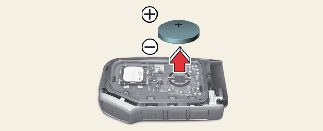
If you are unsure how to use or replace the battery, contact an authorized Kia dealer.
-
Detach mechanical key from your smart key.
-
Pry open the key cover.
-
Replace the smart key cover with a Battery (CR2032).
-
Install the battery in the reverse order of removal.
If the battery is connected with incorrect polarity, it will discharge, rendering the key unusable.
For smart key replacement, visit an authorized Kia dealer.
The smart key is designed to give you years of trouble-free use, however it can malfunction if exposed to moisture or static electricity. If you are unsure how to use or replace the battery, contact an authorized Kia dealer.
Using the wrong battery can cause the smart key to malfunction. Be sure to use the correct battery.


THIS PRODUCT CONTAINS A BUTTON BATTERY
If swallowed, a lithium button battery can cause severe or fatal injuries.
Keep batteries out of reach of children.
If you think batteries may have been swallowed or placed inside any part of the body, seek immediate medical attention.

-
Always insert the key battery with the correct polarity. Incorrect insertion may cause the key to malfunction or the battery to discharge prematurely.
-
Smart key damage
The smart key can malfunction if dropped, exposed to moisture, static electricity, heat or direct sunlight.