
Navigation-based Smart Cruise Control settings
Highway Auto Speed Change
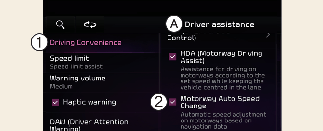
A: Driver assistance
-
Driving convenience
-
Motorway Auto Speed Change
With the vehicle on, touch Settings → Vehicle → Driver assistance → Motorway Auto Speed Change on the infotainment system.

CAUTION
When the trailer is connected, Navigation- based Smart Cruise Control automatically turns off (if equipped). In this case, you cannot get help from Navigation- based Smart Cruise Control. Always drive with care.

NOTICE
When there is a problem with Navigation-based Smart Cruise Control, the function cannot be set from the Settings menu.