
Parking Collision-Avoidance Assist settings
Parking Safety
With the vehicle on, touch Settings → Vehicle → Driver assistance → Parking safety on the infotainment system.
-
Rear safety: Reverse Parking Collision-Avoidance Assist will warn the driver and assist with braking when a collision with a pedestrian or an object is imminent.

Rear safety will be selected and Parking Collision-Avoidance Assist settings will be retained whenever the vehicle is restarted.
Turning Parking Collision Avoidance Assist On/Off
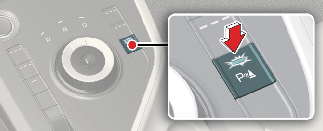
Press and hold the Parking Safety ( ) button more than 2 seconds to turn the Parking Collision-Avoidance Assist on or off.
Warning volume
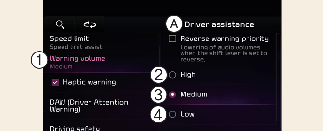
A: Driver assistance
-
Warning volume
-
High
-
Medium
-
Low
-
Off
With the vehicle on, touch Settings → Vehicle → Driver assistance → Warning volume on the infotainment system to change the Warning volume to adjust the Warning volume levels; High, Medium, Low or Off.

When the trailer is connected, Reverse Parking Collision-Avoidance Assist automatically turns off (if equipped). In this case, you cannot get help from Reverse Parking Collision-Avoidance Assist. Always drive with care.
-
If the vehicle is restarted, Warning volume will maintain the last setting.
-
If Off is selected, the Warning volume of Reverse Parking Collision-Avoidance Assist will not turn off, but the volume will sound as Low.
-
If Off is selected, steering wheel vibration will not turn off.
-
If you change the Warning volume, the Warning volume of other Driver Assistance systems may change.