

User settings mode
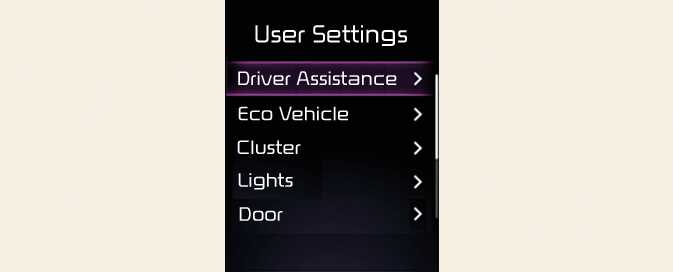
In this mode, you can change the settings of the instrument cluster, doors, lights, etc.
The information provided may differ depending on which functions are applicable to your vehicle.
1. Driver Assistance: (if equipped)
|
Items |
Explanation |
|---|---|
|
Driving Convenience |
|
|
Speed Limit |
|
|
Warning Volume |
|
|
Driver Attention Warning |
|
|
Driving Safety |
|
|
Parking Safety |
|
2. Head-Up Display: (if equipped)
|
Items |
Explanation |
|---|---|
|
Enable Head-Up Display |
Activate/Deactivate |
|
Display Height |
|
|
Rotation |
|
|
Brightness |
|
|
Content Selection |
|
3. Cluster: (if equipped)
|
Items |
Explanation |
|---|---|
|
Theme Selection |
|
|
Wiper/Lights Display |
Activate/Deactivate |
|
Traffic Signs |
Activate/Deactivate |
|
Icy Road Warning |
Activate/Deactivate |
|
Cluster Voice Guidance Volume |
|
|
Welcome Sound |
Activate/Deactivate |
4. Lights: (if equipped)
|
Items |
Explanation |
|---|---|
|
Illumination |
|
|
One Touch Turn Signal |
|
|
Ambient Brightness |
|
|
Ambient Light Color |
|
|
Headlight Delay |
Activate/Deactivate |
|
High Beam Assist |
Activate/Deactivate |
5. Door: (if equipped)
|
Items |
Explanation |
|---|---|
|
Automatically Lock |
|
|
Automatically Unlock |
|
|
2 Press Unlock |
If this item is checked, the two press unlock will be activated. Press the door unlock button once from unlock the driver's door, and press the button once more within 4 seconds to unlock the rest of the doors. |
|
Horn Feedback |
|
|
Power Liftgate |
Activate/Deactivate |
|
Power Liftgate Opening Speed |
|
|
Power Liftgate Opening Height |
|
|
Smart Liftgate |
Activate/Deactivate |
|
Remote Window Control (if equipped) |
Activate/Deactivate |
-
Automatically Lock
-
Enable On Shift: All doors will be automatically unlocked when the vehicle is shifted to P (Park) to R (Reverse), N (Neutral), or D (Drive). (With the vehicle ON, it is activated.)
-
Enable On Speed: All doors will be automatically locked when the vehicle speed is over 9 mph (15 km/h).
-
-
Automatically Unlock
-
On Shift to P: All doors will be automatically unlocked if the gear is shifted to the P (Park) position. (With the vehicle ON, it is activated.)
-
Vehicle Off/On key out (if equipped): All doors will be automatically unlocked when the ignition key is removed from the ignition switch or the EV button is set to the OFF position.
-
6. Convenience: (if equipped)
|
Items |
Explanation |
|---|---|
|
Seat Easy Access |
|
|
Rear Occupant Alert |
Activate/Deactivate |
|
Service Interval |
|
|
Welcome Mirror/Light |
|
|
Wireless Charging System |
Activate/Deactivate |
|
Auto rear wiper (in R) |
Activate/Deactivate |
|
PASSENGER AIR BAG |
Activate/Deactivate |
7. Units
|
Items |
Explanation |
|---|---|
|
Speed Unit |
|
|
Temperature Unit |
|
|
Consumption Unit |
|
|
Tire Pressure Unit |
|
8. Language
|
Items |
Explanation |
|---|---|
|
Language |
Activate |
9. Reset
|
Items |
Explanation |
|---|---|
|
Reset |
Yes/No |