
TPMS reset procedure
You should reset TPMS in below situations.
-
After repairing or replacing tires (or wheels)
-
After rotating tires
-
After adjusting tire pressure
-
When the low tire pressure indicator illuminates
-
After replacing suspension or ABS system
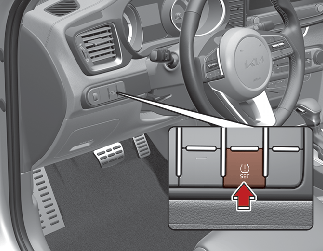
* If the low tire pressure indicator turns on repeat step More Details.
When resetting TPMS, the current tire pressure is stored as a standard tire pressure.

-
Without inflating the tires, if you reset TPMS, the system may not inform you properly even though the tires are significantly under-inflated. You must check the proper tire pressure before resetting TPMS.
-
The TPMS may not function properly if you do not reset TPMS although the TPMS needs to be reset.
-
If you push the TPMS reset button while driving, the TPMS reset process is not activated. You must push the TPMS reset button while the vehicle is at a complete stop.
-
Tire pressure should be checked and inflated while the tires are cold.
A cold tire means the vehicle has been sitting for 3 hours and driven for less than 1.6 km (1 mile) in that 3 hour period.