
Using the smart key (if equipped)
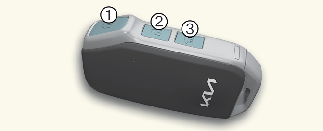
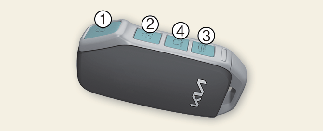
-
Lock button
-
Unlock button
-
Tailgate unlock/open button (if equipped)
-
Remote start button (if equipped)
Operation
-
Press the corresponding button.
Non-operating condition(s)
-
The key is close to a radio transmitter, such as a radio station or an airport which can interfere with normal operation of the smart key.
-
Being near a mobile two-way radio system or a cellular phone.
-
Another vehicle's smart key is being operated close to your vehicle.

-
After pressing the lock/unlock button (1, 2) on the key, the hazard warning lights will blink.
-
After pressing unlock button (2), the doors will lock automatically unless you open any door within 30 seconds.
-
Press and hold the tailgate unlock/open button (3) to unlock or open the tailgate, according to the vehicle options. The tailgate will lock automatically once the tailgate is opened and closed.
-
If any door, hood or tailgate remains open, the hazard warning lights will not blink.
-
If, for some reason, you happen to lose your smart key, you will not be able to start the vehicle. Tow the vehicle, if necessary, contact a professional workshop. Kia recommends to contact an authorized Kia dealer/service partner.
-
A maximum of 2 smart keys can be registered to a single vehicle. If you lose a smart key, Kia recommends to contact an authorized Kia dealer/service partner.
-
When the smart key does not work properly, open and close the door with the mechanical key. If you have a problem with the smart key, Kia recommends to contact an authorized Kia dealer/service partner.
-
If the smart key is not moved for some time, the detection function for smart key operation will pause. Lift the smart key to activate the detection again. (if equipped)
Starting the vehicle remotely (if equipped)
Operation
-
Lock the doors by pressing the lock button (1) within 10 m (32 ft.) distance from the vehicle.
-
Within 4 seconds after locking the doors, press and hold the remote start button (4) for over 2 seconds.
-
Press the remote start button (4) again to turn off the vehicle.
If no further action for operating/driving the vehicle is taken, the vehicle will be turned off 10 minutes after starting the vehicle remotely.
Remote start function for manual transmission (if equipped)
Remote start function for manual transmission allows you to start your vehicle engine remotely from your convenient place by your smartphone (Kia Connect Application) or the smart key with remote start button.
-
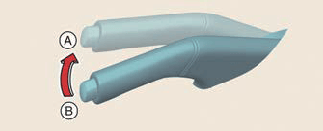
A: 5 notches
-
B: 0 notch
Operating condition(s)
-
All the vehicle doors, including tailgate and bonnet must be closed and locked.
-
Make sure the parking brake lever is pulled more than 5 notches.
-
Place the gear in N (Neutral) position.
-
Vehicle must be parked on a flat surface or road.
-
Smart key must not be placed inside the vehicle.
Non-operating condition(s)
-
If the gear is in other than N (Neutral) position.
-
If the parking brake lever is pulled less than 5 notches.
-
If vehicle is parked on a hilly/inclined road (not flat surface).
-
If the vehicle battery is low.
Notches can be detected as the "click" sound when parking lever is operated.

In order to operate remote start function for manual transmission, the vehicle must be parked on a flat surface.
Removing the mechanical key from the smart key
-
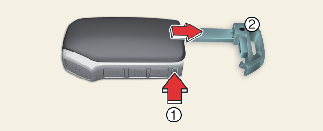
Tab
-
Mechanical key
Operation
-
Press and hold the tab (1).
-
Pull the mechanical key (2) out.