Lane Safety
 N_TK25Z013_E |
|
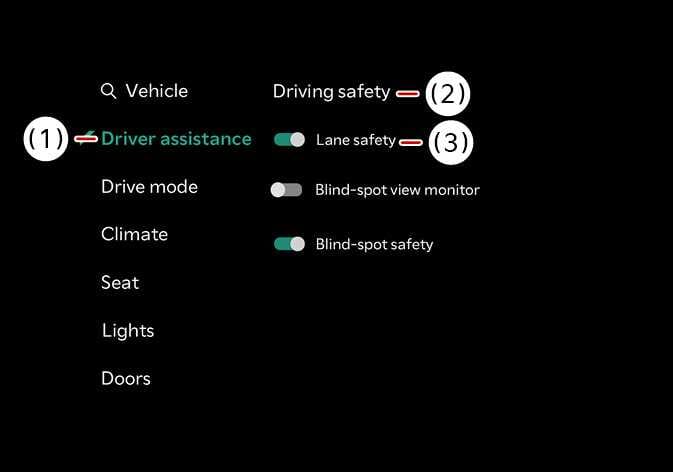
With the vehicle is in DRIVE READY, select on the infotainment system.
-
Lane safety: If Lane safety is selected, Lane Keeping Assist will automatically assist the driver's steering when lane departure is detected to help prevent the vehicle from moving out of its lane. If Lane safety is deselected, the yellow indicator light (
 ) will appear on the cluster.
-
When the vehicle is turned off and restarted, Lane Keeping Assist automatically turns on, and Lane Safety is selected automatically.
-
The driver should always be aware of the surroundings and steer the vehicle if Lane safety is deselected.
When the trailer’s connector is plugged into your vehicle, Lane Keeping Assist automatically turns off. In this case, you cannot get help from Lane Keeping Assist. Pay extra attention when you drive when the function is inactive. (If a Kia genuine Trailer Kit that can determine whether a trailer is connected is used)
-
When the Lane Driving Assist button (
) is pressed and held for more than 2 seconds to turn off Lane Keeping Assist, Lane Safety will also be turned off. -
Except Europe, Australia, Russia, Brazil, Mexico, General
When the vehicle is turned off and then restarted, the Lane Keeping Assist setting will remain as it was before the vehicle was turned off.