

Locking/unlocking with the smart key (Electric type): (if equipped)
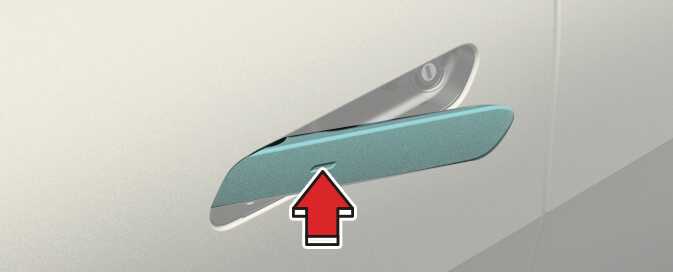
The outside door handle will slide out and the doors will unlock when the driver approaches the vehicle possessing the smart key. (Approach unlock system)
Operation
-
Select Settings → Vehicle → Door → Approach unlock in the infotainment system screen.
-
The outside door handle will pop out and the door will unlock when the driver approaches the vehicle possessing the smart key.
-
The driver can activate/deactivate the Approach unlock system on the infotainment screen.
-
In emergency situations, such as battery is dead, the outside electric door handle can still be operated in a way that the outside manual door handle operate.
-
If Approaching unlock system is deactivated, the door handle will not pop out even when the driver approaches to the vehicle with the smart key. To unlock doors when Approach unlock system is deactivated, touch the lock/unlock sensor on the handle.
-
Press the lock button on the smart key and hold the lock and unlock button simultaneously for more than approximately 4 seconds to prevent unintentional door lock/unlock. The hazard warning lights will blink 4 times. The doors will not lock or unlock even though the touch sensor is touched on the outside door handle. Press the door lock or unlock button on the smart key to deactivate the function.
-
When washing the vehicle
-
Self car wash
Keep the door locked with the outside door handle closed. To keep the door unlocked, push back the outside door handle by hand. This function prevents the door handle from being damaged, and the door handle pops out again when the unlock button is pressed.
-
Auto car wash
Keep the door locked with the outside door handle closed. If the smart key is not in the vehicle, turn off the vehicle and stay the smart key away at least 2 m (78 inches) from the vehicle to prevent the outside door handle operates.
-