
Outside rearview mirror
Adjusting the outside rearview mirror
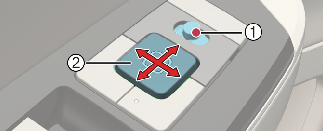
Operation
-
Move the outside rearview mirror switch (1) to select the left or right side.
-
Adjust the mirror adjustment control (2) to move the selected mirror.
Operating condition(s)
-
The vehicle is in POWER ON or DRIVE READY position
Folding the outside rearview mirror
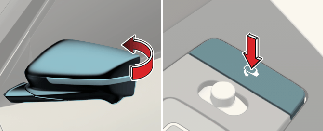
Operation
-
Press the button to fold or unfold the mirror.
On door unlock
Select Setup → Vehicle → Lights → Welcome Mirror → On door unlock in the infotainment system screen.
The outside rearview mirror will be folded when all doors are locked.
-
When press the lock button on the smart key.
-
When touching the front door handle button while possessing the smart key.
-
The outside rearview mirror will be unfolded when all doors are unlocked.
On driver approach
Select Setup→ Vehicle → Lights → Welcome Mirror → On driver approach in the infotainment system screen.
Approach the front outside door handle within 0.7–1 m radius (28–40 in) while possessing the smart key when all doors closed and locked. The outside rearview mirror will be unfolded.

-
On door unlock should be selected to use On driver approach.
-
For the safety of the driver, if you are driving at a speed of 15 km/h (10 mph) or higher, the outdoor mirror won't be folded.

Do not fold outside rearview mirror while driving, it may interfere with driving and cause an accident.
Auto reverse function (if equipped)
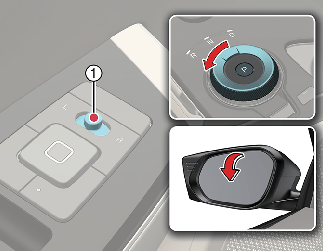
With the outside rearview mirror switch (1) positioned to the left or right, the left and right outside rearview mirrors automatically move to the default provision position to improve driver visibility when the vehicle is in reverse.
The auto reverse function provides the ability to store and recall the outside rearview mirror position set by the user with integrated memory system button while the vehicle is in R (Reverse) position.
Storing memory positions
-
Park the vehicle in a safe place while vehicle is in the POWER ON or DRIVE READY position.
-
Move the switch to the L or R position depending on the mirror you want to adjust.
-
Shift to R (Reverse) while pressing the parking brake.
* When you set the outside rearview mirror initially, the outside rearview mirror will move downwards to its default position.
-
Press the adjustment control to adjust the selected mirror.
-
Press the desired memory button (1 or2).
The system will beep once, and then the driver's seat position, outside rearview mirror position, steering wheel position, and head-up display height will automatically adjust to the stored positions.
-
Set the opposite outside rearview mirror the same way as described above (1~5).
Recalling memory positions
-
The outside rearview mirror switch (1) position determines the mirror movement:
-
L/R: Outside rearview mirrors will move.
-
Center: Outside rearview mirrors will not move.
-
-
Press the desired memory button (1 or 2).
The driver's seat position, outside rearview mirror position, steering wheel position, and head-up display height will automatically adjust to the stored positions.
-
Shift to R (Reverse) while pressing the parking brake.
-
The outside rearview mirror adjusts downward automatically to the stored positions saved on memory button (1 or 2).

-
Do not scrape ice off the mirror face; this may damage the surface of the glass. If ice should restrict the movement of the mirror, do not force the mirror for adjustment. To remove ice, use a deicer spray, or a sponge or soft cloth with warm water.
-
When cleaning the mirror, do not directly spray the detergent to the mirror, but put the detergent on a soft towel or cloth and clean the mirror with it. If you spray the detergent directly to the mirror, the detergent may permeate into the mirror frame and cause a malfunction.
-
Vibration and noise may be generated because the gear is not precisely engaged, so if you operate again by using the switch, the gear will be precisely engaged and the vibration and noise will disappear.
-
If the mirror is jammed with ice, do not adjust the mirror by force. Use an approved spray deicer (not cooling system antifreeze) to release the frozen mechanism or move the vehicle to a warm place and allow the ice to melt.
-
The mirrors stop moving when they reach the maximum adjusting angles, but the motor continues to operate while the switch is pressed. Do not press the switch longer than necessary, the motor may be damaged.
-
Do not attempt to adjust the outside rearview mirror by hand. Doing so may damage the parts.
-
The electric type outside rearview mirror operates even though the vehicle is in the OFF position. However, to prevent unnecessary battery discharge, do not adjust the mirrors longer than necessary while the vehicle is not running.
-
In case it is an electric type outside rearview mirror, don't fold it by hand. It could cause motor failure.
-
We recommend following the procedures in an orderly manner to change or initialize the auto reversing user settings. If you move to the next step before completing the previous one, the changed angle may not be changed or initialization may not work properly.
-
The outside rearview mirror is convex. Objects seen in the mirror are closer than they appear.
-
Use your interior rearview mirror or direct observation to determine the actual distance of following vehicles when changing lanes.
-
Do not adjust or fold the outside rearview mirrors while the vehicle is moving. This could result in loss of control, and an accident which could cause DEATH, SERIOUS INJURY, or property damage.
Digital Center Mirror (DCM) (if equipped)
The DCM is a system that uses the camera on the rear of the vehicle and displays its image on the screen of the DCM. The DCM allows the driver to see the rear view despite obstructions, such as the headrest or luggage, ensuring rear visibility.
-
Failure to follow the warnings and instructions for proper use of the DCM could result in serious accident.
-
The DCM is a convenience feature and is not a substitute for proper vehicle operation. The system has areas where objects cannot be viewed. Check the blind spot of the DCM before vehicle operation. The driver is always responsible for safe driving.
-
Do not operate the DCM while driving. Doing so be a distraction and it could lose control of your vehicle and cause an accident or serious injury.
-
Do not disassemble or modify the DCM, the camera unit or wiring. It may result in an accident or fire. If you notice smoke or an odor coming from the DCM, stop using the system immediately. We recommend you have the vehicle inspected by an authorized Kia dealer/service partner.
-
-
Be sure to adjust the DCM before driving.
-
Switch the system to the conventional rearview mirror mode and be properly seated on the driver’s seat. Then adjust the mirror to see outside the rear window properly.
-
Push the lever all the way to change to digital mirror mode and adjust the display settings. Driving without adjusting the mirror may cause difficulty in watching the display at the Digital Mirror mode (camera view mode) due to reflection from the surface of the mirror.
-
-
If the DCM malfunctions, immediately switch the system to the conventional rearview mirror mode.
-
When sunlight or high beams from following vehicles occurs, it may appear on the screen of the DCM. Switch the system to the conventional rearview mirror mode appropriately.
-
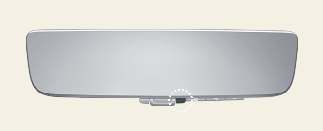
If the camera lens (1) is dirty, the displayed image may not be clear. Clean it with a soft cloth or swab dampened with water.
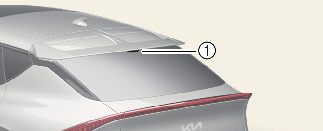
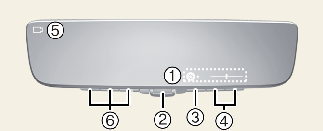
System component
-
Icon display area
Displays icons, adjusting Brightness & Tilt
-
Lever
Operate to change between digital mirror mode and optical mirror mode.
-
Menu button
Press to display the icon display area and select the item you want to adjust (Brightness & Tilt).
-
Select/adjust button
Press to change the setting of the item you want to adjust.
-
Camera indicator
Indicates that the camera is operating normally.
-
HomeLink buttons
For the operation of the “HomeLink® Universal Transceiver”.
How to change the mode
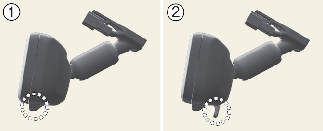
-
Pull the mode select lever to all the way switch to the DCM mode (camera view mode).
* Displays an image of the area behind the vehicle. In this mode, the camera indicator is shown.
-
Push the mode select lever to all the way switch to the optical inside rearview mirror mode.
* Turns off the display of the DCM allows it to be used as an optical mirror.
Adjusting the mirror height
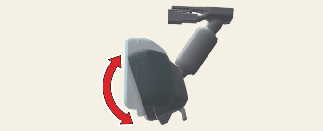
The height of the rearview mirror can be adjusted to suit your driving posture.
Change to optical mirror mode, adjusting the rearview mirror angle by moving it up and down.
Display settings (Digital mirror mode)
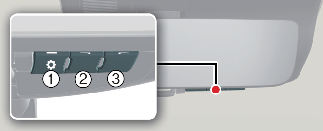
-
Press the menu button (1) The icons will be displayed.
Icons
Settings

Select to adjust the brightness of the display.

Select to adjust the display up/down.
-
Press the menu button (1) repeatedly and select the item you want to adjust.
-
Press the button (2) or button (3) to change the setting.
The icons will disappear if the button is not operated for approximately 5 seconds or more.
* If the brightness of the DCM is set too high, it may cause eye strain.
Adjust the DCM to an appropriate brightness. If your eyes become tired, change to optical mirror mode.
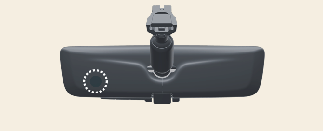
To prevent the light sensors from malfunctioning, do not touch or cover them.
Digital mirror mode operating condition
The DCM operates when the EV button is in the on position. When the EV button is changed to off, the image will disappear.
When using the Digital Center Mirror in digital mirror mode
-
When the tailgate is open, the DCM image may not display properly. Before driving, make sure the tailgate is closed.
-
If the display is difficult to see due to reflected light, close the sunshade of the sunroof. (if equipped)
-
Any of the following conditions may occur when driving in the dark. None of them indicates that the malfunction has occurred.
-
Color of objects in the displayed image may differ from their actual color.
-
Depending on your physical condition or age, it may take longer than usual to focus on the displayed image. If you have trouble focusing, change to optical mirror mode.
-
Do not let passengers stare at the displayed image when the vehicle is being driven as it may cause motion sickness.
-
-
If it is difficult to see the DCM display screen because of a strong external light, switch the mode to the conventional rearview mirror mode for better use.
When the system malfunctions
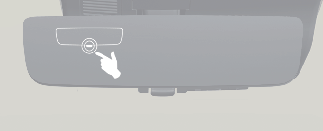
If the symbol shown in the illustration is displayed when using the DCM in digital mirror mode, the system may be malfunctioning. The symbol will disappear in a few seconds. Change to optical mirror mode and have the vehicle inspected by an authorized KIA dealer.
-
To prevent the DCM from malfunctioning.
-
Do not use detergents, such as thinner, benzene, or alcohol to clean the mirror. They may discolor, deteriorate or damage the mirror surface.
-
Do not remove, disassemble or modify the mirror and camera.
-
Do not allow an organic solvent, vehicle wax, window cleaner or glass coating to adhere to the camera. If this happens, wipe it off as soon as possible.
-
When cleaning the camera lens, wipe the camera lens with a damp soft cloth.
-
Do not rub the camera lens with force, as it may be scratched and will not be able to transmit a clear image.
-
Do not subject the camera to a strong impact.
-
Operating the system in the on position could discharge the battery.
-
Do not put the antenna of wireless device near the DCM. Electronic waves from a wireless device may distort the image in DCM.
-
Do not push buttons excessively or operate the lever aggressively.
-
Never rotate the body of DCM by 90° or more.
Digital Center Mirror error icon and solution
|
Symptom |
Likely cause |
Solution |
|---|---|---|
|
If the high temp icon ( |
The DCM is extremely hot. (The display will gradually become dimmer. If the temperature continues to increase, the DCM will turn off.) |
Reducing the cabin temperature is recommended to reduce the temperature of the mirror. (The icon will disappear when the mirror becomes cool.) If the icon does not disappear even though the mirror is cool, have the vehicle inspected by an authorized Kia dealer. |
|
If the display icon |
The system may malfunction. |
Change to optical mirror mode and have the vehicle inspected by an authorized KIA dealer. |
 ) is displayed on the display right side.
 has been switched to
  which is the display error icon.