
Driver Attention Warning settings
With the vehicle on, select Setup → Vehicle → Driver Assistance→ Driver Attention Warning on the infotainment system.
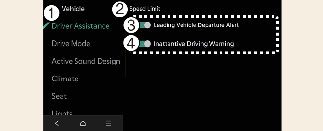
-
Driver Assistance
-
Driver Attention Warning
-
Leading Vehicle Departure Alert
-
Inattentive Driving Warning Alert
-
Leading Vehicle Departure Alert: Driver Attention Warning will inform the driver when a detected vehicle in front departs from a stop.
-
Inattentive Driving Warning: Enables the Inattentive driving warning

-
The Inattentive Driving Warning settings menu is not displayed in locations where the Inattentive Driving Warning is always active.
-
For Europe
In regions where Inattentive Driving Warning function always on, the Inattentive Driving Warning settings will not be displayed.
-
For Australia and Russia
When you turn off and restart the vehicle, the Inattentive Driving Warning will automatically turn on