
LCD display modes
|
|
||||
|---|---|---|---|---|
 Trip Computer |
 Turn by Turn (TBT)* |
 Driving Assist |
Information/Master warning |
|
|
Up/Down |
Current Trip |
Route Guidance |
Lane Keeping Assist Smart Cruise Control Navigation-based Smart Cruise Control* Lane Following Assist Highway Driving Assist* |
The Master Warning mode displays warning messages related to the vehicle when one or more systems is not operating normally. |
|
Since Refueling |
Destination Info |
|||
|
Since Last Reset |
Tire Pressure Monitoring System |
|||
 Mode
Mode




The information provided may differ depending on which functions are applicable to your vehicle.
* : if equipped

Keep the engine running when configuring the display settings to prevent the battery from discharging.
Trip computer mode
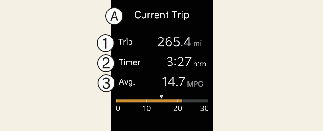
A: Current Trip
-
Trip
-
Timer
-
Avg.
The trip computer mode displays information related to vehicle driving parameters including fuel economy, tripmeter information and timer.
* For more details, refer to More Details.
Driving Assist mode

This mode displays the state of:
-
Lane Keeping Assist
Smart Cruise Control (if equipped)
Navigation-based Smart Cruise Control (if equipped)
Lane Following Assist
Highway Driving Assist (if equipped)
* For more details, refer to each system information in More Details.
Turn By Turn (TBT) mode

This mode displays the state of the navigation.
Information mode

A: Engine temperature
This gauge indicates the temperature of the engine coolant when the engine is running.
If the gauge indicator is of the normal range, toward the "130 or H (Hot)" position, it indicates overheating of the engine. It may damage the engine. Do not continue driving with an overheated engine.
This mode displays information related to Tire Pressure.
* For more details, refer to More Details.
Master warning mode

This mode informs you of the following situations:
-
Driver assistance system malfunction, limitation or radar/camera blockage (if equipped)
-
LED headlamp malfunction
-
Lamp malfunction
-
TPMS (Tire Pressure Monitoring System) failure, low tire pressure, etc.
The Master Warning icon ( ) will appear. If the situation re solves, the master warning light will turn off and the Master Warning icon will disappear.