
Paddle shifter
The paddle shift function is available when the shift dial SBW is in the D (Drive) position.
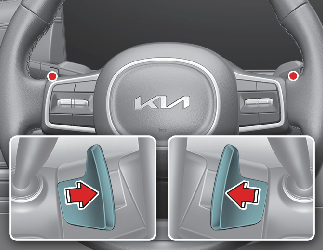
With the shift dial SBW in the D position
Pull the [+] or [-] paddle shifter once to shift up or down one gear and the system changes from automatic mode to manual mode.
To change back to automatic shift mode from manual shift mode, do one of the followings:
-
Pull the [+] paddle shifter for more than one second.
The manual shift mode also changes back to automatic shift mode in one of following situations:
-
When the accelerator pedal is gently depressed for more than approximately 6 seconds while driving
-
When the vehicle speed is lower than 2 mph (3 km/h) (after driving more than 7 mph (10 km/h)

If you pull the [+] and [-] paddle shifters at the same time, you cannot shift the gear.
Paddle shifter
The paddle shift function is available when the dial SBW is in the D (Drive) position.
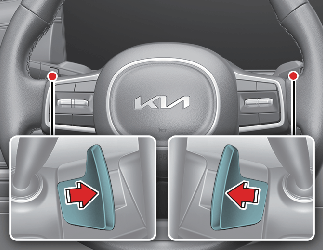
With the dial SBW in the D position
The paddle shifter will operate as manual shift mode when the drive mode is in SPORT or TERRAIN mode. (if equipped)
In ECO or SMART mode, the paddle shifter will modify regeneration braking mode.
Pull the [+] or [-] paddle shifter once to shift up or down one gear and the system changes from automatic mode to manual mode.
To change back to automatic shift mode from manual shift mode, do one of the followings:
-
Pull the [+] paddle shifter for more than one second
-
Rotate the shift dial to D (Drive) position.
The manual shift mode also changes back to automatic shift mode in one of following situations:
-
When the accelerator pedal is gently depressed for more than 6 seconds in TERRAIN mode. (if equipped)
When the accelerator pedal is not depressed for about 6 minutes in SPORT mode.
-
When the vehicle stops
If you pull the [+] and [-] paddle shifters at the same time, you cannot shift the gear.
Regenerative braking mode

Operation
-
Pull the left side (-) of the paddle shifter to increase regenerative braking and deceleration.
-
Pull the right side (+) of the paddle shifter to decrease regenerative braking and deceleration.
Pull and hold the right side (+) of the paddle shifter to turn on or off smart regeneration system.

-
The initial setting will be set to 0 when the vehicle is in D (Drive) and in ECO mode.
-
If the vehicle changes to P (Park), R (Reverse), N (Neutral) or vehicle is in SPORT or TERRAIN mode (if equipped), the vehicle regenerative braking system control will not be operated. Resetting the vehicle in D (Drive) will set the regenerative system settings to the previously set steps.
-
ABS and ESC will deactivate the regenerative system.
-
Even if the setting for regenerative braking system is identical, it might feel different due to various vehicle speeds. (the higher speed, the less deceleration feeling)
-
The regenerative braking system can be controlled
-
when the vehicle is nearly stopped in D (Drive).
-
when you are not depressing brake pedal while the vehicle is driving in D (Drive).
-
Regenerative braking uses motor’s power to conserve energy to the high-voltage battery when braking to gain more fuel economy and higher efficiency.
Battery charged, Regenerative braking mode deactivated
The message will appear when the high-voltage battery amount is charged enough.
Regenerative braking mode by paddle shifter not activated
The message will appear when:
-
When the battery is in high or low temperature
-
When the battery or transmission is not functioning properly
-
Regenerative braking mode is activated while ABS/Cruise Control/Smart Cruise Control is operating
Drive normally and use the function again to dismiss the message.
Smart regeneration system
The system minimizes the unnecessary operation of the brake and acceleration pedal, improving the electric efficiency and assisting the driver.
Setting smart regeneration system

-
With the vehicle on, touch Settings → Vehicle → Eco Vehicle → Smart Recuperation on the infotainment system or pull and hold the right side paddle shifter for over 1 second to turn on and off the automatic change of the regenerative braking.
The level of regenerative braking displayed on the cluster in stages is converted to the 'AUTO' indicator light.
-
When the vehicle is turned off and then turned on again, the regenerative braking mode returns to step ‘0’.
The infotainment system may change after software updates. For more information, refer to the manual provided in the infotainment system and the quick reference guide.
Smart regeneration system activation
With 'AUTO' for the regenerative braking level displayed on the cluster, the regenerative braking level is controlled automatically when vehicle speed is above 3.1 mph (5 km/h) and one of the condition below is met.
-
The road gradient changes
-
Distance from the vehicle ahead reduces or increases
-
Speed of the vehicle ahead reduces or increases
When vehicle speed is under 3.1 mph (5 km/h), the Smart Regeneration System is canceled. The driver must adjust the vehicle speed by depressing the accelerator or brake pedal according to the road condition ahead and driving condition.
When the system is turned on from the Vehicle Settings menu, but the front radar does not recognize the vehicle in front, 'AUTO' is displayed in white.
If the front radar recognizes the vehicle in front, 'AUTO' is displayed in green. The regenerative braking level is automatically controlled depending on the driving condition of the vehicle in front and the level is indicated with arrows.
And, the system is canceled temporarily if the accelerator pedal is depressed.

The Smart Regeneration System which automatically controls the regenerative braking level when coasting is only a supplemental system for the driver's convenience. Do not solely rely on this system to stop the vehicle. The system cannot completely stop the vehicle in all situations nor avoid all collisions. The brake control may be insufficient depending on the speed of the vehicle in front and when the vehicle in front suddenly stops, a vehicle cuts in suddenly or there is a steep slope. Always look ahead cautiously to prevent unexpected and sudden situations from occurring.
Smart regeneration system will be temporarily canceled when:
-
Canceled manually
With the vehicle on, touch Setup →Vehicle → Eco Vehicle → Smart Recuperation on the infotainment system or pull and hold the right side paddle shifter for over 1 second.
The Smart Regeneration System turns off and switches to the regenerative braking level indicator or turned off depending on currently set regenerative braking level.
-
Canceled automatically
-
The vehicle is shifted to N (Neutral), R (Reverse) or P (Park).
-
Switch the DRIVE mode to SPORT or TERRAIN mode. (if equipped)
-
Smart Cruise Control is in activation.
-
The ESC (Electronic Stability Control) or ABS is operating.
-
If the motor and battery are in high or low temperature, or there is a problem with the battery or transmission.
-
SOC (State of Charge) gauge indicates high level.
-
When the Smart Regeneration System is canceled automatically, adjust the vehicle speed directly by depressing the accelerator or brake pedal according to the road and driving conditions ahead.
The infotainment system may change after software updates. For more information, refer to the manual provided in the infotainment system and the quick reference guide.
Resuming smart regeneration system
To re-activate the Smart Regeneration System while driving,
with the vehicle on, touch Setup →Vehicle → Eco Vehicle → Smart Recuperation on the infotainment system or pull and hold the right side paddle shifter for over 1 second.
Then AUTO for the regenerative braking level will appear on the cluster.
The infotainment system may change after software updates. For more information, refer to the manual provided in the infotainment system and the quick reference guide.
Basic setting of smart regeneration system
With the Smart Regeneration System ON, Pull and hold the right side of the paddle shifter for more than 1 second to set the regenerative braking level.
The automatic regenerative braking step adjustment by the smart regenerative system operates in steps beyond the set basic step.
Vehicle-to-vehicle distance recognition sensor
Dirt, snow, or foreign substances on the lens may adversely affect the sensing performance of the sensor. In this case, the system operation may stop temporarily and not operate normally.
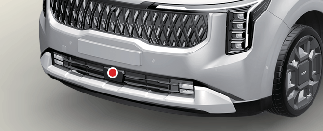
-
Do not apply license plate frame or foreign objects such as a bumper sticker or a bumper guard near the radar sensor. Doing so may adversely affect the sensing performance of the radar.
-
Always keep the radar sensor and lens cover clean and free of dirt and debris.
-
Use only a soft cloth to wash the vehicle. Do not spray pressurized water directly on the sensor or sensor cover.
-
Be careful not to apply unnecessary force on the radar sensor or sensor cover. If the sensor is forcibly moved out of proper alignment, the Smart Regeneration System may not operate correctly. In this case, a warning message may not be displayed. Have the vehicle inspected by an authorized Kia dealer.
-
If the front bumper becomes damaged in the area around the radar sensor, the Smart Regeneration System may not operate properly. Have the vehicle inspected by an authorized Kia dealer.
-
Use only Kia Genuine Parts or those of an equivalent standard to repair or replace a damaged sensor or sensor cover. Do not apply paint to the sensor cover.
System malfunction
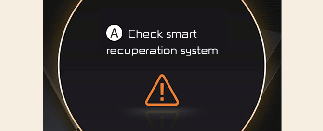
A: Check smart recuperation system
The message will appear when the system is not functioning normally. The system will be canceled and the word 'AUTO' on the cluster will disappear and instead display regenerative braking level. Check for foreign substances on the front radar. Remove any dirt, snow, or foreign material that could interfere with the radar sensors. If the system still does not operate normally, take your vehicle to an authorized Kia dealer and have the system checked.
Limitations of the system
Driver's attention is required in such cases when the system does not react properly or operate unintentionally.
Driving on a curved road
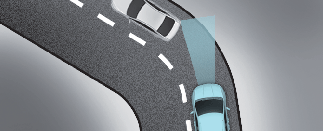
When driving on the curve, the system may not detect the vehicle in your lane and the regenerative braking level will reduce automatically, making you feel that the vehicle is accelerating.
Also, if the system suddenly recognizes the vehicle in front, the regenerative braking level will increase automatically, making you feel that the vehicle is decelerating.
The driver must maintain a safe braking distance, and if necessary, depress the brake pedal to reduce your driving speed in order to maintain a safe distance.
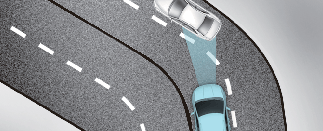
The smart regeneration system may recognize a vehicle in an adjacent lane when driving on a curved road. In this case, the system increases the braking level and slow the vehicle.
Always pay attention to road and driving conditions while driving. If necessary, depress the brake pedal to reduce your driving speed in order to maintain a safe distance. Also, when necessary, you may depress the accelerator pedal to prevent the system from unnecessarily decelerating your vehicle.
Always check the traffic conditions around the vehicle.
Driving on a sloped road
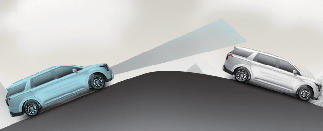
When driving uphill or downhill, the system may not detect the vehicle in your lane and the regenerative braking level will reduce automatically, making you feel that the vehicle is accelerating.
Also, if the system suddenly recognizes the vehicle in front, the regenerative braking level will increase automatically, making you feel that the vehicle is decelerating.
The driver must maintain a safe braking distance, and if necessary, depress the brake pedal to reduce your driving speed in order to maintain a safe distance.
Changing lanes
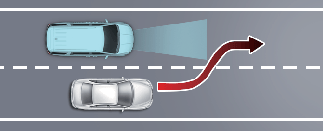
When a vehicle changes lanes in front of you, the smart regeneration system may not immediately detect the vehicle, especially if the vehicle changes lanes abruptly. In this case, you must maintain a safe braking distance, and if necessary, depress the brake pedal to reduce your driving speed in order to maintain a safe distance.
Recognizing the vehicle
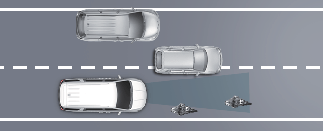
Some vehicles in your lane cannot be recognized by the sensor:
-
Narrow vehicles such as motorcycles or bicycles
-
Vehicles offset to one side
-
Slow-moving vehicles or sudden-decelerating vehicles
-
Stopped vehicles (When the vehicle ahead drives away, the system may not detect a stopped vehicle.)
-
Vehicles with small rear profile such as trailers with no loads
A vehicle ahead cannot be recognized correctly by the sensor if any of following occurs:
-
When the vehicle is pointing upwards due to overloading in the luggage compartment
-
While the steering wheel is operating
-
When driving to one side of the lane
-
When driving on narrow lanes or on curves
Apply the brake or accelerator pedal if necessary.
When using the Smart Regeneration System take the following precautions:
-
If an emergency stop is necessary, you must apply the brakes.
-
Keep a safe distance according to road conditions and vehicle speed. If the vehicle distance is too close during high-speed driving, a serious collision may result.
-
Always maintain sufficient braking distance and decelerate your vehicle by applying the brakes if necessary.
-
The Smart Regeneration System is designed to detect and monitor the vehicle ahead in the roadway through radar signals. It is not designed to detect oncoming vehicles, pedestrians, bicycles, motorcycles, or smaller wheeled objects such as luggage bags, shopping carts, or strollers.
-
Vehicles moving in front of you with frequent lane changes may cause a delay in the system's reaction or may cause the system to react to a vehicle actually in an adjacent lane. Always drive cautiously to prevent unexpected and sudden situations from occurring.
-
The Smart Regeneration System may not recognize complex driving situations so always pay attention to driving conditions and control your vehicle speed.
The Smart Regeneration System may not operate temporarily due to:
-
Electrical interference
-
Modifying the suspension
-
Differences of tire abrasion or tire pressure
-
Installing different type of tires
Shift lock system
For your safety, your vehicle has a shift-lock system which prevents shifting the gear from P (Park) or N (Neutral) into R (Reverse) or D (Drive) unless the brake pedal is depressed.
To shift from P (Park) or N (Neutral) into R (Reverse) or D (Drive), from R (Reverse) into D (Drive) or from D (Drive) into R (Reverse):
-
Depress and hold the brake pedal.
-
Start the vehicle or place the ENGINE START/STOP button in the ON position.
-
Turn the dial SBW to the R (Reverse) or D (Drive) position.
Parking
When the battery (12 V) is discharged
You cannot shift the gear when the battery is discharged.
Jump start your vehicle (refer to More Details) or contact an authorized Kia dealer/service partner.
LCD display messages
Shifting conditions not met

A: Shifting conditions not met
The message appears on the LCD display in the following conditions:
-
When driving speed is too fast to shift the gear. Decrease the vehicle speed or slow down before shifting the gear.
Press brake pedal to change gear
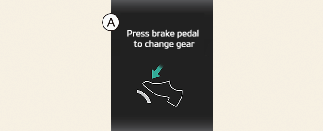
A:Press brake pedal to change gear
The message appears on the LCD display, when the brake pedal is not depressed while shifting the gear.
Depress the brake pedal and then shift the gear.
Shift to P after stopping

A:Shift to P after stopping
The message appears on the LCD display when the gear is shifted to P (Park) while the vehicle is moving.
Stop the vehicle before shifting to P (Park).
Gear already selected

A:Avoid shifting for a few seconds
The message appears on the LCD display when the P gear is selected again or the gear is overheated.
PARK malfunction. Engage parking brake when parking vehicle

A:PARK malfunction. Engage parking brake when parking vehicle.
The message is displayed when there is a problem with function engaging P (Park) position.
Immediately have your Kia inspected by an authorized Kia dealer.
Check P button

A:Check P button
The message appears on the LCD display when there is problem with the P button.
Immediately have your Kia inspected by an authorized Kia dealer.
Check dial SBW

A:Check shifter dial
The message appears on the LCD display when there is problem with the dial SBW.
Immediately have the vehicle inspected by an authorized Kia dealer.
Rotary shifter stuck

A:Rotary shifter stuck
The message appears on the LCD display when the dial SBW is continuously stuck or there is problem with the dial SBW.
Make sure that there is no object around the dial SBW. If the problem persists, immediately have your Kia inspected by an authorized Kia dealer.
Good driving practices
-
Never move the shift dial from P (Park) or N (Neutral) to any other position with the accelerator pedal depressed.
-
Never move the shift dial into P (Park) when the vehicle is in motion.
-
Be sure the vehicle is completely stopped before you attempt to shift into R (Reverse) or D (Drive).
-
Never take the vehicle out of gear and coast down a hill. This may be extremely hazardous. Always leave the vehicle in gear when moving.
-
Do not "ride" the brakes. This can cause them to overheat and malfunction. Instead, when you are driving down a long hill, slow down and shift to a lower gear. When you do this, engine braking will help slow down the vehicle.
-
Slow down before shifting to a lower gear. Otherwise, the lower gear may not be engaged.
-
Always use the parking brake. Do not depend on placing the transmission in P (Park) to keep the vehicle from moving.
-
Exercise extreme caution when driving on a slippery surface. Be especially careful when braking, accelerating or shifting gears. On a slippery surface, an abrupt change in vehicle speed can cause the drive wheels to lose traction and the vehicle to go out of control.
-
Optimum vehicle performance and economy is obtained by smoothly depressing and releasing the accelerator pedal.
-
When driving uphill or downhill, always shift to D (Drive) for driving forward or shift to R (Reverse) for driving backwards, and check the gear position indicated on the cluster before driving. Driving in the opposite direction of the selected gear can lead to a dangerous situation by shutting off the engine and affecting the braking performance.
-
Always buckle-up! In a collision, an unbelted occupant is significantly more likely to be seriously injured or killed than a properly belted occupant.
-
Avoid high speeds when cornering or turning.
-
Do not make quick steering wheel movements, such as sharp lane changes or fast, sharp turns.
-
The risk of a rollover is greatly increased if you lose control of your vehicle at highway speeds.
-
Losing control often occurs if two or more wheels drop off the roadway and the driver oversteers to reenter the roadway.
-
In the event your vehicle leaves the roadway, do not steer sharply. Instead, slow down before pulling back into the travel lanes.
-
Never exceed posted speed limits.
If your vehicle becomes stuck in snow, mud, sand, etc., then you may attempt to rock the vehicle free by moving it forward and backward. Do not attempt this procedure if people or objects are anywhere near the vehicle. During the rocking operation the vehicle may suddenly move forward or backward as it becomes unstuck, causing injury or damage to nearby people or objects.
Moving up a steep grade from a standing start
To move up a steep grade from a standing start:
-
Depress the brake pedal, shift the shift dial to D (Drive).
Select the appropriate gear depending on load weight and steepness of the grade, and release the parking brake. Depress the accelerator gradually after releasing the service brakes.