

Transmission ranges
The indicator on the instrument cluster displays the gear shift lever position when the ENGINE START/STOP button is in the ON position.
P (Park)
Always come to a complete stop before shifting the gear to P (Park).
To shift the gear from P (Park), engage the brake pedal firmly and make sure your foot is off the accelerator pedal.
The gear shift lever must be in P (Park) before you turn the engine OFF.
-
Shifting the gear to P (Park) while the vehicle is in motion may cause you to lose control of the vehicle.
-
After you stop the vehicle, always make sure the gear shift lever is in P (Park), apply the parking brake, and turn the engine OFF.
-
Do not shift the gear to P (Park) instead of applying the parking brake.
R (Reverse)
Shift the gear to R (Reverse) to drive your vehicle backward.
Always come to a complete stop before shifting the gear to or from R (Reverse). Shifting the gear to R (Reverse) while your vehicle is in motion may damage the transmission.
N (Neutral)
In N (Neutral), the wheels and transmission are not engaged.
Do not shift the gear unless your foot is firmly on the brake pedal. Shifting the gear when the engine is running at a high speed can cause the vehicle to move very rapidly. You could lose control of the vehicle and hit people or objects.
Do not drive with the gear shift lever in N (Neutral). The engine brake does not work in N (Neutral), which may lead to an accident.
-
After you press the ENGINE START/STOP button in the OFF position, you cannot release the Electronic Parking Brake (EPB).
-
When you use the AUTO HOLD function while driving a vehicle equipped with EPB, if you press the ENGINE START/STOP button in the OFF position, the EPB is applied automatically. Turn the AUTO HOLD function OFF before you press the ENGINE START/STOP button in the OFF position.
D (Drive)
D (Drive) gear is the normal forward driving gear shift position. The transmission automatically shifts through an 8-gear sequence to provide the best fuel economy and power.
For extra power when passing another vehicle or climbing uphill, engage the accelerator fully. The transmission automatically shifts down to the next lowest gear.
To stop the vehicle while driving, engage the brake pedal fully to prevent unintended movement.
Manual mode
 OMQ4A045004 |
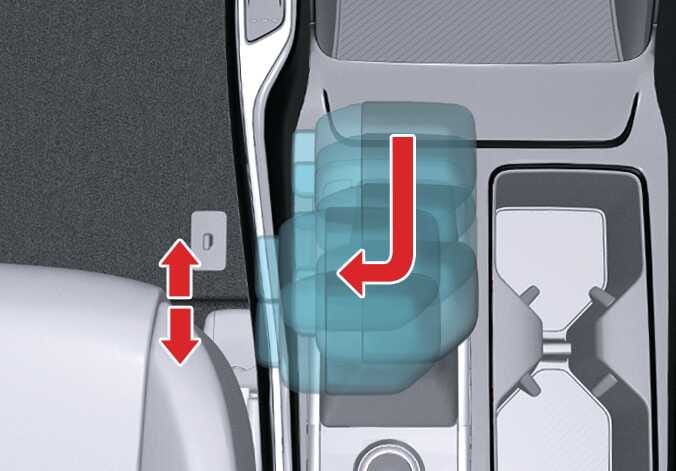
Whether the vehicle is stationary or in motion, you can select Manual mode by pushing the gear shift lever from D (Drive) into the manual gate. To return to D (Drive) range operation, push the gear shift lever back into the main gate.
In manual mode, moving the gear shift lever back and forth allows you to shift gears rapidly. Unlike a manual transmission, manual mode allows you to shift gears while engaging the accelerator pedal.
-
Up (+): Push the lever forward once to shift up 1 gear.
-
Down (-): Pull the lever backward once to shift down 1 gear.
-
Shift the gear upward according to the driving conditions, taking care to keep the engine speed below the red zone.
-
You can only select the 8 forward gears. To reverse or park your vehicle, move the gear shift lever to R (Reverse) or P (Park) as required.
-
The gear shifts down automatically when you slow down your vehicle. When you stop your vehicle, the 1st gear is selected automatically.
-
When the engine RPM approaches the red zone, the gear shift points are varied to shift up automatically.
-
To maintain the required levels of vehicle performance and safety, the system may not execute certain shifts between gears when you operate the gear shift lever.
-
When driving on a slippery road, push the gear shift lever forward into the Up (+) position so that the transmission shifts into 2nd gear, which helps with smooth driving on slippery roads. To shift back into 1st gear, push the gear shift lever into the Down (-) position.