
Scheduled charging
-
You can schedule charging using the infotainment system. Refer to the infotainment system for detailed information about charge scheduling.
-
Scheduled charging can only be done when using an AC charger or the portable charging cable (ICCB: In-Cable Control Box).
-
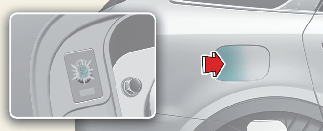
When scheduled charging is set and the AC charger or the portable charging cable (ICCB: In-Cable Control Box) is connected for charging, the scheduled charge release button illuminates for 3 minutes to indicate that scheduled charging is set.
-
If charging is required immediately, turn off the scheduled charge using the infotainment system and the Kia Connect application, or press the vehicle's scheduled charge release button (
 ) for more than 2 seconds.
-
When the scheduled charge is set, the charge start time is self-calculates.
-
If you press the scheduled charging deactivation (
) button to immediately charge the battery, charging must be initiated within 3 minutes after the charging cable has been
connected.

When you press the scheduled charging deactivation (
) button for immediate charging, the scheduled charge setting is not completely deactivated. If you need to completely deactivate
the scheduled charge setting, use the infotainment system to finalize the deactivation.
Refer to More Details or More Details for details about connecting the AC charger and the portable charger (ICCB: In-Cable Control Box).