

Warning Methods
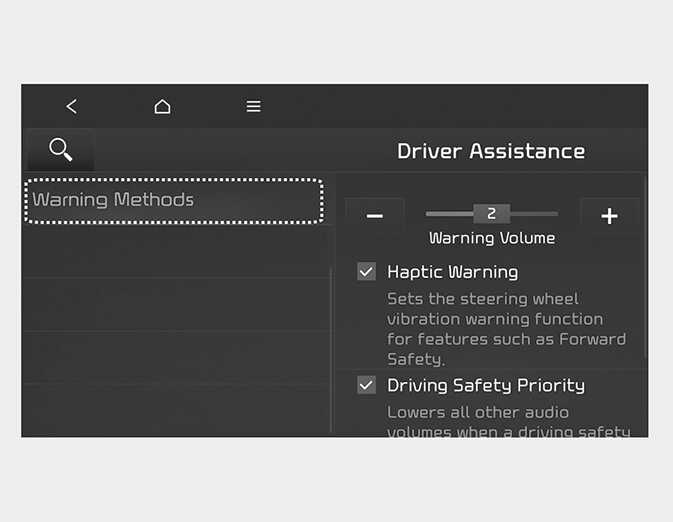
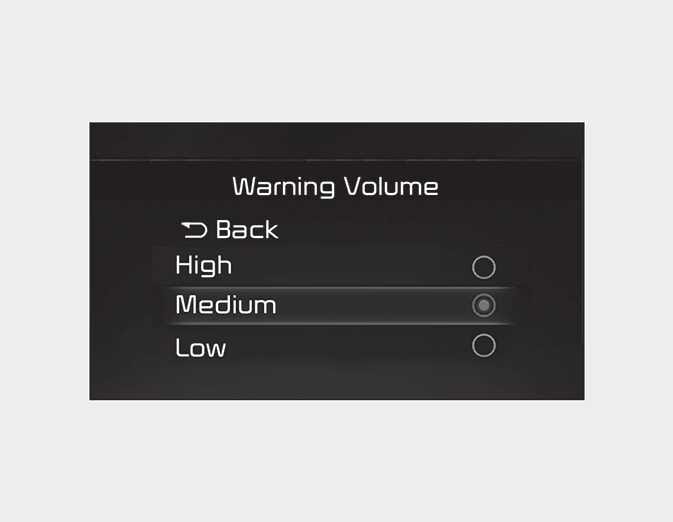
You can adjust the Warning Methods with the ignition switch or ENGINE START/ STOP button in the ON position.
-
Warning Volume : Select 'User Settings → Driver Assistance → Warning Volume' on the LCD display or 'Settings → Vehicle → Driver Assistance → Warning Methods → Warning volume' on the Infotainment system. Even if '0' or 'Off' is selected, the function's Warning Volume will not turn off but the Hands off warning volume will sound as '1' or 'Low'.
-
Driving Safety Priority : Select ‘Vehicle Settings → Driver Assistance → Warning Methods → Driving Safety Priority’ on the Infotainment system. For safe driving, the audio volume will temporarily decrease to warn the driver with the audible warning.
-
Ensure that warning sound you have set may apply to the warning volume of other driver assistance systems.
-
Warning Methods will maintain its last setting even if the vehicle is restarted.
-
The setting menu may not be available for your vehicle depending on the vehicle features and specifications.
-
Descriptions of each driver assistance system may be slightly different from the owner's manual after updating the software of your infotainment system. In this case, scan the QR code in the infotainment system manual to access the web manual for checking the changes.
-
Depending on your update, the menu may be displayed as Warning Sound or Warning Methods.