

Mechanical key
When the battery of the smart key is discharged or the smart key does not operate normally, the door can be locked or unlocked using the mechanical key.
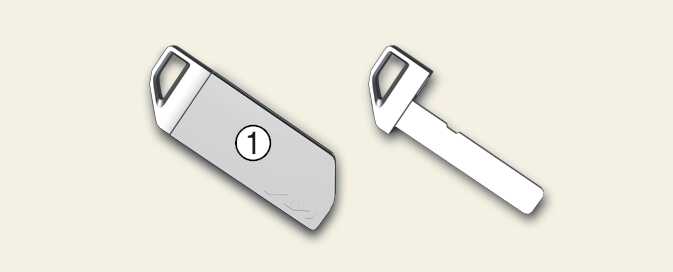
To remove the mechanical key, pull the mechanical key protective cover(1) from the mechanical key.
Smart key precautions
The smart key may not work if any of the following occur:
-
The smart key is close to a radio transmitter such as a radio station or an airport which can interfere with normal operation of the smart key.
-
The smart key is near a mobile two-way radio system or a cellular phone.
-
Another vehicle's smart key is being operated near your vehicle.
When the smart key does not work correctly, open and close the door with the mechanical key and contact an authorized Kia dealer.
If the smart key is near to your cell phone or smart phone, the signal from the smart key could be blocked by normal operation of your cell phone or smart phone. This is especially important when the phone is active, such as when making calls, receiving calls, text messaging, and/or sending/receiving emails. Avoid placing the smart key and your cell phone or smart phone in the same pants or jacket pocket and maintain adequate distance between the two devices.
If the smart key is not moved for some time, the detection function (if equipped) for smart key operation will pause. Lift the smart key to activate the detection again.
Loss of the smart key
A maximum of 2 smart keys can be registered to a single vehicle.
If you happen to lose both smart key, you will not be able to start the vehicle. You should immediately contact your authorized Kia dealer for assistance (tow the vehicle, if necessary) to protect it from potential theft.
Transmitter
Keep the transmitter away from water or any liquid, as it can become damaged and not function properly.
-
To prevent the smart key from becoming damaged by magnetic fields, do not leave it near the following electrical appliances:
-
TVs
-
Personal computers
-
Cellular phones, cordless phones and battery chargers
-
Table lamps
-
Induction cookers
-
-
If you must leave the vehicle's key with a parking attendant, remove the mechanical key for your own use and provide the attendant with the smart key only.
-
When bringing a smart key onto an airplane, make sure you do not press any button on the key while inside the cabin. If you are carrying the key in your bag etc., make sure that the buttons cannot be pressed accidentally. If you press a button, the key may emit radio waves that could interfere with the operation of the aircraft.