

Wide view mode in Reverse
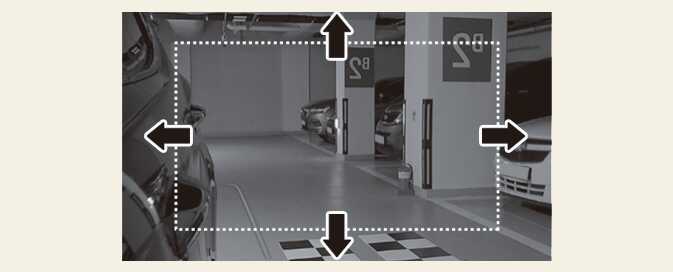
When shifting to the R (Reverse) position, the DSM monitor screen can be switched to wide view. When switching to wide view, a guideline is displayed, allowing you to check the parking lines of the vehicle next to you and the side/rear parking lines.
-
Guidelines appearing on the DSM monitor when reversing indicate the following points:
-
Approximately 12 inches (30 cm) from the side of the vehicle
-
Approximately 20 inches (50 cm) and approximately 3 ft (1m) from the rear of the vehicle
-
-
When shifting from R (Reverse) to N (Neutral) or driving at a speed of about 6 mph (10 km/h) or more after shifting to D (Drive), the normal view is switched.
-
The wide view works only when the DSM monitor screen switching function is used when reversing, and the general view works in P (Parking), N (Neutral), D (Driving) positions.
Operation
-
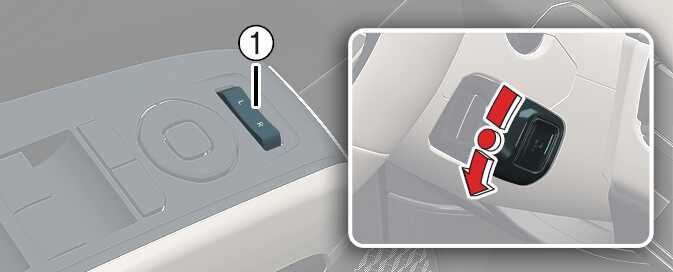
Select L (driver's seat) or R (passenger's seat) with the DSM camera control select switch (1).
-
When shifting to the R (Reverse) position, both DSM monitors switch to wide view.
-
When the DSM camera control select switch (1) is placed in the center position, both DSM monitors will not switch to wide view.
If there is a problem with the DSM, the screen will not be displayed on the DSM monitor and the warning message ‘Please check DSM system’ will be displayed on the instrument cluster. Check the surroundings with the rear side monitor screen displayed on the cluster and the interior mirror when the turn signal is operated, immediately stop in a safe place, and have your vehicle inspected by an authorized Kia dealer.