

Using the smart key: (if equipped)
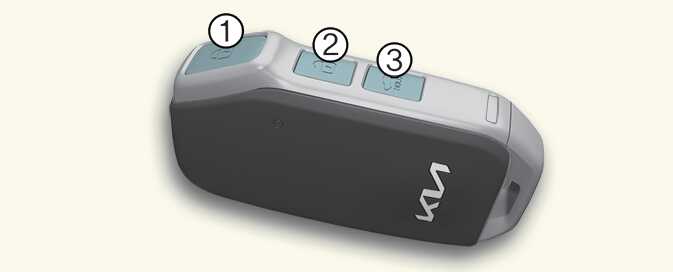
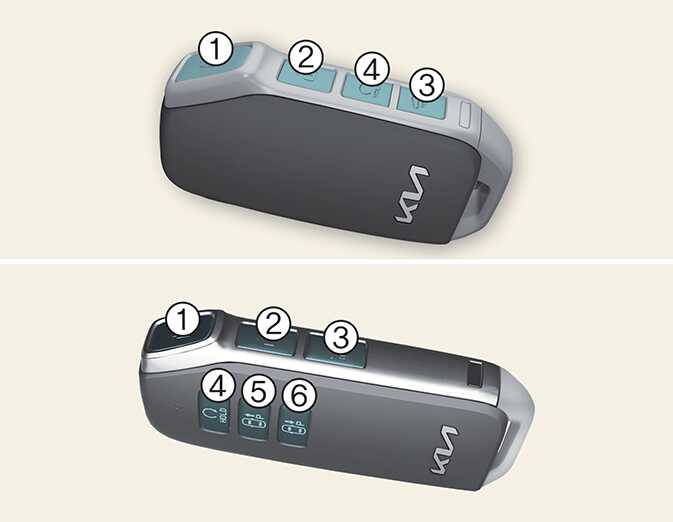
-
Lock button
-
Unlock button
-
Tailgate unlock/open button: (if equipped)
-
Remote start button: (if equipped)
-
Remote Start Parking Assist (Forward) button: (if equipped)
-
Remote Start Parking Assist (Backward) button: (if equipped)
Operation
-
Press the corresponding button.
Non-operating condition(s)
-
The key is close to a radio transmitter, such as a radio station or an airport which can interfere with normal operation of the smart key.
-
Being near a mobile two-way radio system or a cellular phone.
-
Another vehicle's smart key is being operated close to your vehicle.
-
After pressing the lock/unlock button (1, 2) on the key, the hazard warning lights will blink.
-
After pressing unlock button (2), the doors will lock automatically unless you open any door within 30 seconds.
-
Press and hold the tailgate unlock/open button (3) to unlock or open the tailgate, according to the vehicle options. The tailgate will lock automatically once the tailgate is opened and closed.
-
If any door, hood or tailgate remains open, the hazard warning lights will not blink.
-
If, for some reason, you happen to lose your smart key, you will not be able to start the vehicle. Tow the vehicle, if necessary, contact a professional workshop. Kia recommends to contact an authorized Kia dealer/service partner.
-
A maximum of 2 smart keys can be registered to a single vehicle. If you lose a smart key, Kia recommends to contact an authorized Kia dealer/service partner.
-
When the smart key does not work properly, open and close the door with the mechanical key. If you have a problem with the smart key, Kia recommends to contact an authorized Kia dealer/service partner.
-
Tinting the vehicle windows with film, especially metalized film, may interfere with receiving frequency transmitted by the smart key, reducing its operating range.