

Locking/unlocking with the central door lock switch
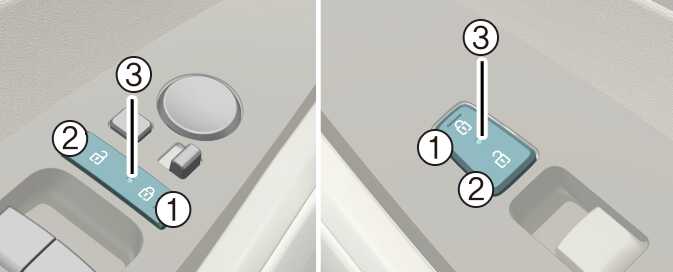
-
Door lock button
-
Door unlock button
-
Door indicator light
Operation
-
Press the corresponding button below.
-
Switch (1): Lock
-
Switch (2): Unlock
-
-
When all vehicle doors are locked, the door indicator light (3) on the driver's door and passenger's door will turn on. If any door is unlocked, it would go off.
-
If any door is opened, the doors will not lock even though the central door lock switch is pressed.
-
The doors should always be fully closed and locked while the vehicle is in motion to prevent accidental opening of the door. Locked doors will also discourage potential intruders when the vehicle stops or slows down.
-
Be careful when opening doors and watch out for vehicles, motorcycles, bicycles or pedestrians approaching the vehicle in the path of the door. Opening a door when something is approaching can result in an accident to cause vehicle damage or serious injury.
-
Leaving your vehicle unlocked can increase the risk of vehicle theft or any possible criminal harm caused by someone hiding in your vehicle while you are gone. Always remove the ignition key, engage the parking brake, close all windows and lock all doors when leaving your vehicle unattended.
-
Unattended children, the elderly or pets
An enclosed vehicle can become extremely hot, causing death or severe injury to unattended children or animals who cannot escape the vehicle. Furthermore, children might operate features of the vehicle that could injure them, or they could encounter other harm, possibly from someone gaining entry to the vehicle. Never leave children or animals unattended in your vehicle.