

Applying AUTO HOLD
Operation
-
Press the AUTO HOLD button. The AUTO HOLD indicator will illuminate white.
-
The AUTO HOLD indicator changes from white to green when the vehicle is stopped.
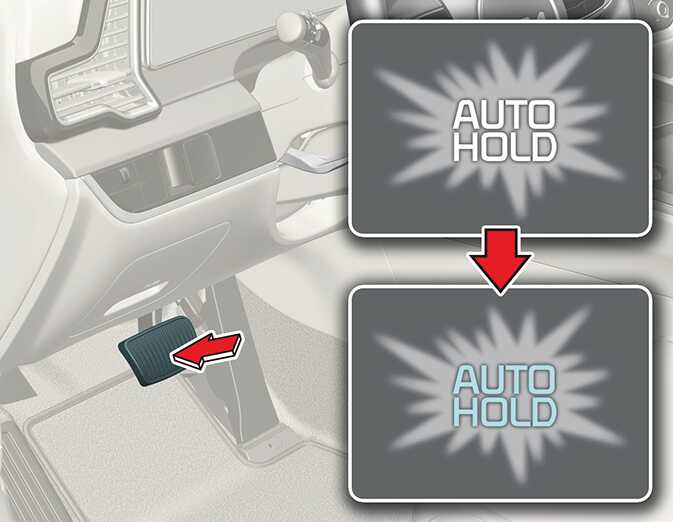 ONQ5041010_2
 -
AUTO HOLD will be released automatically when the accelerator pedal is depressed in D, R or in the manual mode. the AUTO HOLD indicator changes from green to white.
-
Press the AUTO HOLD button again while depressing the brake pedal to cancel the AUTO HOLD operation.
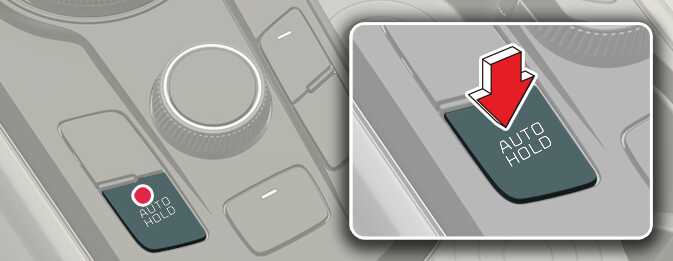 ONQ5041011
Non-operating condition(s)
-
The gear is in P (Park)
-
The EPB is applied
If the vehicle is restarted with the AUTO HOLD button pressed, AUTO HOLD will be in the standby state.
-
To reduce the risk of an accident, do not activate AUTO HOLD while driving downhill, backing up or parking your vehicle.
-
For shift lever type, AUTO HOLD will not be activated when the gear is in R (Reverse).
-
If the AUTO HOLD indicator lights up yellow, the AUTO HOLD is not working properly. Take your vehicle to a professional workshop and have the system checked. Kia recommends to visit an authorized Kia dealer/service partner.
-
A click or electric brake motor whine sound may be heard while operating or releasing the EPB, but these conditions are normal and indicate that the EPB is functioning properly.