

Turning Lane Keeping Assist On/Off
 ONQ5H054030 |
Whenever the vehicle is turned on, Lane Keeping Assist will always turn on and a gray indicator light will appear on the cluster.
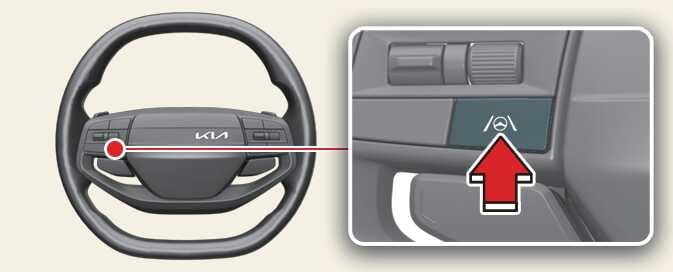
If you want to turn off Lane Keeping Assist, press and hold the Lane Driving Assist button ( ) to turn off the function. The indicator light will turn yellow if you turn off Lane Keeping Assist.
With the vehicle on, press and hold the Lane Driving Assist button () located on the steering wheel to turn on and off Lane Keeping Assist.
The indicator light on the cluster will light up if you turn on Lane Keeping Assist.The indicator light will turn yellow if you turn off Lane Keeping Assist.
-
When the operating condition of LKA are met, the cluster is illuminated with a green (
 ) indicator.
 -
When the operating conditions are not met, a gray (
) indicator is illuminated.