
Smart Cruise Control settings
Based on Driving Mode
Smart Cruise Control will change acceleration based on the drive mode selected from Drive Mode Integrated Control function. Refer to the following chart.
|
Drive Mode |
Smart Cruise Control |
|---|---|
|
SMART |
Normal |
|
ECO |
Normal |
|
SPORT |
Fast |

-
For more details on Drive Mode, refer to More Details
-
Smart Cruise Control may not turn on or off in some of the drive modes for the operating conditions are not satisfied.
-
If your vehicle is not equipped with Drive Mode Integrated Control system, Smart Cruise Control accelerates your vehicle at a normal level.
Warning Methods
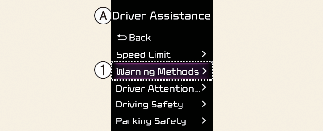
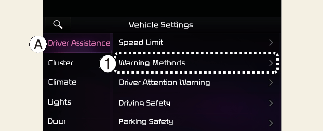
A: Driver Assistance
-
Warning Methods
The Warning Methods can be scan be set with the vehicle on. Select Setup → Vehicle → Driver Assistance → Warning Methods from the settings menu in the infotainment system to change the following settings:
-
Warning Volume: Adjusts the volume of the warning sound.
If you turn off the Warning Volume, for your safety, the function may warn you with a low volume.
-
Haptic Warning: Activate the steering wheel vibration warning. (if equipped)
-
Driving Safety Priority: Lowers all other audio volumes when the Driving Safety system sounds a warning.
-
If you change the Warning Methods, it can be applied to each function of the driver assistance system. Please check and change it in each function.
-
If the vehicle is restarted, Warning Methods will maintain the last setting.
-
The setting menu may not exist based on vehicle specification.
-
The Warning Volume and Haptic Warning cannot be turned off at the same time. When one of the warning is turned off the other is activated.